Participant
May 4, 2020
Answered

Help with script for calculating number of checked boxes

  • May 4, 2020
  • 1 reply
  • 426 views

Hi, thanks for trying to help!


I have a form I'm working on for evaluations. 

I have 7 rows of check boxes, each collum has 3 differnt check boxes (If they pass, fail, or it wasnt observed).

Row 1 - Boxes named 5.1 (Export Value is Yes1, Yes2, Yes 3) for each box - So only 1 box can be checked

Row 2 - Boxes named 5.2 (same export)

Row 3 - Boxes named 5.3 (same export)

Row 4 - Boxes named 5.5 (same export)

Row 5 - Boxes named 5.5 (same export)

Row 6 - Boxes named 5.6 (same export)

Row 7 - Boxes named 5.7 (same export)


I'm trying to run a script to calculate the total number of Yes1 check marks on the page.  Can anyone help me, the script I've been writing is not working. 
This topic has been closed for replies.
Correct answer JR Boulay

You don't need a JavaScript.

Replace the "Yes1" value by "1" in all rows, leave other rows untouched (be sure that they don't have a export value that is a number).


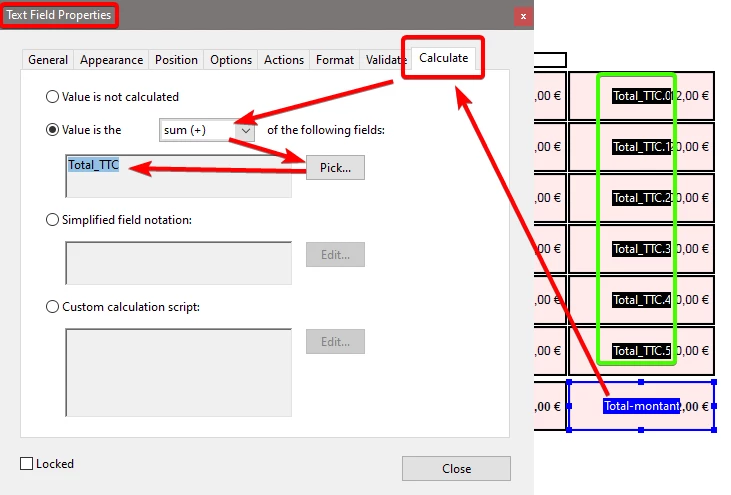
So in the TOTAL field you just have to make the sum of the field "Boxes named 5"

Without the dot and without the last number.

You will find this "virtual" parent field in the list which allows you to select the fields to calculate.


As for these text fields:


1 reply

JR Boulay
Community Expert
JR BoulayCommunity ExpertCorrect answer
Community Expert
May 4, 2020

You don't need a JavaScript.

Replace the "Yes1" value by "1" in all rows, leave other rows untouched (be sure that they don't have a export value that is a number).


So in the TOTAL field you just have to make the sum of the field "Boxes named 5"

Without the dot and without the last number.

You will find this "virtual" parent field in the list which allows you to select the fields to calculate.


As for these text fields:


Acrobate du PDF, InDesigner et Photoshopographe