
Participating Frequently
November 22, 2021
Question

Hervorheben funktioniert bei manchen PDFs nicht

  • November 22, 2021
  • 1 reply
  • 5265 views

Bei manchen PDFs aus dem Internet scheitert bei mir - glaube, seit dem letzten Update - das Hervorheben. Schon bei der Textauswahl geht der "Markierungsschatten" über mehrere Zeilen. Das Ergebnis ist dann eine große Blase statt einiger markierter Wörter:
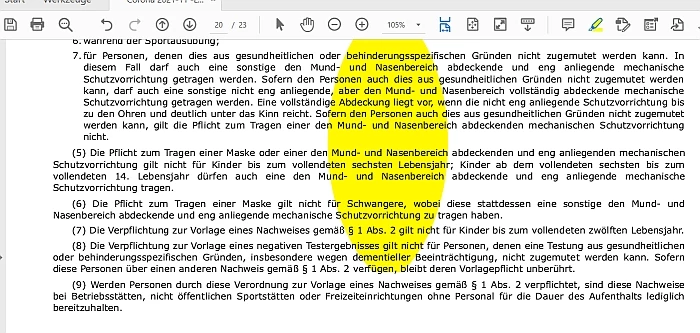
 

Bereinigen der betreffenden PDFs löst das Problem nicht.

Was hakt da?

PS: Mit einem Konkurrenzprogramm klappt das Markieren auch dieser PDFs einwandfrei,

This topic has been closed for replies.

1 reply

gary_sc
Community Expert
Community Expert
November 22, 2021

Good day Sepp,


I'm sorry but I cannot replicate your problem. However I do have a hunch what might be causing it.


First off, when you have the Highlight tool selected, do you see an Ellips anywhere along the tool bar? It should look like this:


If you click on that you should bring up the Highlight Tools controls, they look like this:

Note that the bottom one changes line thickness. Is the circle on the line over to the right or left side? If it's on the right side, please try moving it over the left side. Does that help?


But one other thing, If you do not have the Highlight tool selected, and you try to select text in the document, does the whole page turn blue?


If so, that means that the text is NOT selectable and the Highlight tool will not work normally. Can you verify that the text is selectable?


Thank you,

Sepp5FF5Author
Participating Frequently
November 22, 2021

Thank you for your reply. 

I do not find the 3 points of "Options", after having chosen the Highlight Tool. I was looking for it elsewhere, could not find! I use Acrobat Pro DC v 2021.007.20099

When I don't have the Highlight tool selected and try to select text in the document, the whole page turn blue ... yes. But in another PDF-Reader the same PDF-text is selectable and can be highlighted!