
Steve MacLaurin
Participant
April 9, 2015
Answered

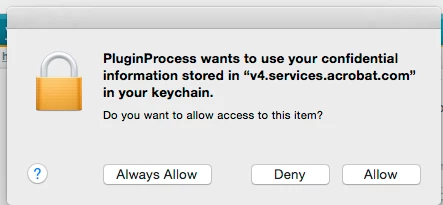
Hi, Anyone know what this means please: Plugin process wants to use confidential information stored in "v4.services.acrobat.com" in keychain?

  • April 9, 2015
  • 14 replies
  • 59717 views

Hi,

Got the above message today when exiting Safari browser. May have been coincidental.

Does anyone know what this plugin process is please? I updated to Acrobat DC two days ago and wasn't using acrobat when I got this message.
This topic has been closed for replies.
Correct answer Junius

Steve,

I just spoke w/Adobe. This dialog box and its reference to information is only for and is restricted to our personal Acrobat accounts and is not for access to or by any outside party or parties. Adobe said that, in fact, we have to "Allow" this or we will not be able to view documents that are not stored on our machines or stored in the cloud.

Hope this helps,

~ JB III

14 replies

Participant
June 9, 2015

Adding my voice here...  No way Adobe.  [DENY] [DENY] [DENY] [DENY] [DENY] [DENY] [DENY] [DENY] [DENY] [DENY] [DENY] [DENY] [DENY] [DENY] [DENY] [DENY] [DENY] [DENY] [DENY] [DENY] [DENY] [DENY] [DENY] [DENY] [DENY] [DENY] [DENY] [DENY] [DENY] [DENY] [DENY] [DENY] [DENY] [DENY] [DENY] [DENY] [DENY] [DENY] [DENY] [DENY]

Oh my gosh, will it ever stop?!  But seriously, the answer is NO!

Participating Frequently
June 12, 2015

I have found that if I hit deny enough times, eventually the dialog box will go away. It appears to have no effect on reading the online PDF. So the box is really meaningless.

Known Participant
June 12, 2015

Jonathan - I think the magic number for me is 17 or 18 times.

Known Participant
May 23, 2015

I just want to drop a note in here to let you all know that Junius is not correct. You can still view any PDF anywhere. The issue is you have to click Deny 17-22 times. If you want to change the size of the PDF online, another 17-22 clicks.

I don't use keychain, but I am still not letting Adobe access it. There is no need. Ever.

Known Participant
May 23, 2015

Additionally note #3 under Safari instructions. It states in Adobe's documentation (AKA the screenshot) that

"Adobe Reader" does not support the highest level of security for Safari Plugins.

Websites using this plugin may be able to access your personal documents and data.

This screams to me NO!

brandbrilliance
Participating Frequently
May 8, 2015

Yeah. Adobe, Please fix this nonsense. I don't want a "Cloud" only solution for PDFs. That was a HUGE mistake. You can download the App from the cloud and update it from the cloud and add service to it from the cloud but don't make it a "browser in the cloud" app. That's nonsense. What about people in countries who don't have internet access all the time, and is spotty.

Inspiring
May 10, 2015

I really believe Acrobat is run as a separate company - it is the "evil" Adobe. It is completely different culturally and behaviorally from the professional, well run company that does their mainstream products.

Participating Frequently
May 16, 2015

I have no intention to keeping any of my files or information in anyone's cloud. I have full Acrobat and Reader and this problem with PlugInProcess happened after the new version of Acrobat was installed little over a month ago. Also I am getting really tired of daily clicking on deny every time I get into cookies and website data in Safari security to clear items. There is no logical reason for Adobe to access the keychain under these circumstances.

Junius
Participant
April 10, 2015

I have the same question and can't find the answer anywhere. When attempting to access PDF documents on the web the dialog box closes momentarily when selecting Deny only to return again and again and I am unable to view or access the PDF download.

If anyone can help us it will be greatly appreciated.

Thanks

Junius
JuniusCorrect answer
Participant
April 10, 2015

Steve,

I just spoke w/Adobe. This dialog box and its reference to information is only for and is restricted to our personal Acrobat accounts and is not for access to or by any outside party or parties. Adobe said that, in fact, we have to "Allow" this or we will not be able to view documents that are not stored on our machines or stored in the cloud.

Hope this helps,

~ JB III

Steve MacLaurin
Participant
April 10, 2015

‌Thanks for your persistence and help with this Junius. I tried contacting the Adobe team, but got into a long queue and they didn't seem to know the answer. Perhaps this should be in their help database.

Seems bizarre that viewing of PDF's are now tracked?

Best wishes,

Steve