
Known Participant
August 8, 2024
Answered

Hide or calculate field based on another field

  • August 8, 2024
  • 1 reply
  • 749 views

I have below script. But I cannot seem to get it to work.

var v1 = Number(this.getField("Text2").value);
if (v1=="") eventvalue = "";
else event.value = v1-0.75


I had below before, which worked. But then I also need field Tex5 to be hidden when Text2 is empty

var v1 = Number(this.getField("Text2").value)
event.value = v1-0.75
This topic has been closed for replies.
Correct answer Bernd Alheit

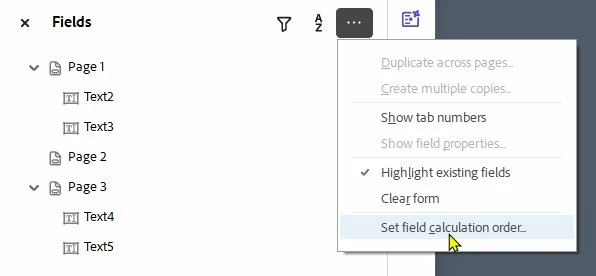
You can change it at:

1 reply

Bernd Alheit
Community Expert
Community Expert
August 8, 2024

Try this:

var v1 = Number(this.getField("Text2").value);
if (v1==0) event.value = "";
else event.value = v1-0.75

Known Participant
August 8, 2024

thank you, this works. 
I still seem to be having issues though.

I have textfield Text 3 which has this code:

var v1 = Number(this.getField("Text2").value);
var v2 = Number(this.getField("Text1").value);
if (v1==0) event.value = "";
else event.value = v2-v1

This works fine.

And I have text field Text6

Which has this code:
var v5 = Number(this.getField("Text3").value);
if (v5==0) event.value = "";
else event.value = v5-0.25

Which works once. after that it keeps showing the wrong number.

If I remove the number from text2, it does show nothing, but if I enter a number again it only show -0,25

Bernd Alheit
Community Expert
Community Expert
August 8, 2024

Change the field calculation order.