
High CPU on Acrobat Pro (64-bit)
The issue persists already for several months. Unfortunately, did not notice when exactly started.
So we have Acrobat Pro, version 2022.003.20314 (64-bit), Windows 11. There are three issues:
(1) After opening Acrobat (usually when you open a file, but sometimes when you just launch) in 15-20 sec the program freezes for about 10 sec. Then you can work normally and unless you open another pdf all is fine.
(2) Almost always upon fully closing Acrobat task manager shows a process Acrobat.exe that is still running. This process takes 25-30% of CPU and remains forever unless you close it by End task. Sometimes, if you have opened and closed another instance of Acrobat without hanging the Acrobat.exe process, then a new background Acrobat.exe process appears. They all drain CPU eventually rising to 100%.
(3) Adobe plug-in in Chrome and Edge is often not working. Either need to restart the PC or shutdown Acrobat.exe process numerous times.
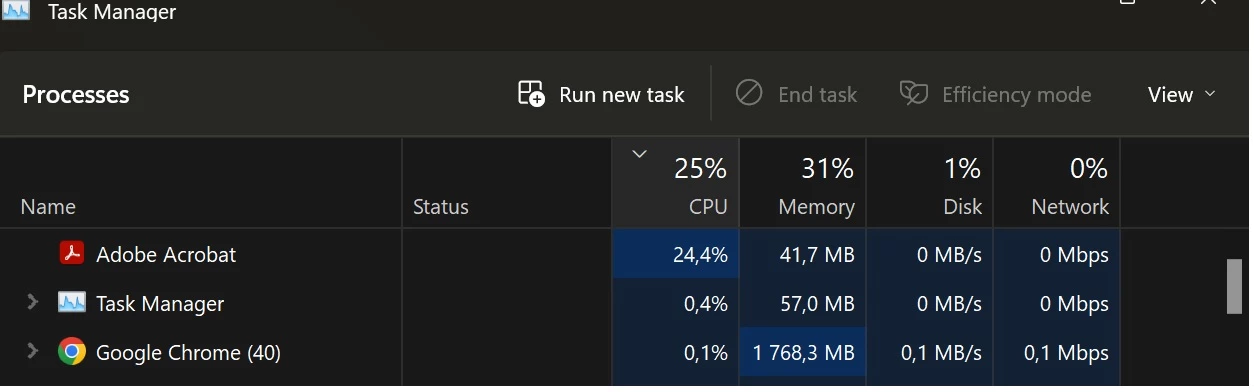
Both (1) and (2) problems seem to happen more often when opening files on the network. Opening local files usually works fine. Problem (3) is probably caused by errors from problems (1) and (2).
Already tried the following: (a) disabling the Protected Mode at Startup, (b) reinstalling / repairing Acrobat, (c) a fresh install of Acrobat on a different PC. Nothing helped.
Would highly appreciate any help. Please let me know if you need any logs.


 AdChoices