



Stijn D
Participant
May 28, 2026
Question

highlight colors

  • May 28, 2026
  • 1 reply
  • 10 views

Is there a way to change the pop-up box with the 21 predefined colors? I would like to create my own custom colors and use my own predefined color palette for any new PDF I open.

At the moment, I have not found a way to permanently change colors to something other than the 21 shown below. I know you can set a default new color, but that color isn't added to the predefined box. (and the default color method only allows to change one color, and not a whole set).
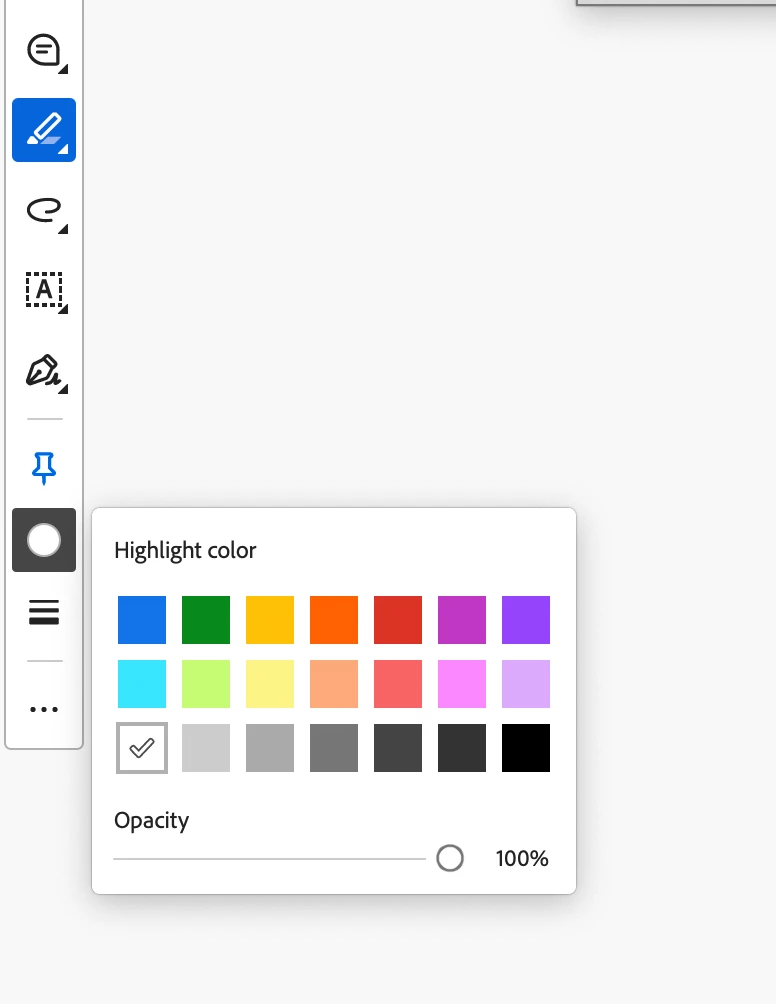



    1 reply

    Meenakshi0101
    Community Manager
    Community Manager
    May 28, 2026

    Hi Stijn D,


    Thank you for reaching out.


    As mentioned, you are trying to change the default colour palette for the highlighter. Currently, there is no default option to make the changes in the options provided. We will check with the team once.


    If you have any questions, please don't hesitate to ask.


    Thanks,

    Meenakshi

    Stijn D
    Stijn DAuthor
    Participant
    May 28, 2026

    Thanks! For now, I use the cmd+E trick to get more colors available in a clickable palette, but it would be easier if there were a series of colors to click from with a single click in a docked properties bar right below the menu bar.

    Anand Sri Bhattacharya
    Community Manager
    Community Manager
    May 28, 2026

    @Stijn D, I hope you are doing well. You can use the Adobe Wish form to file a feature request with the product team directly.


    Regards,

    Anand Sri.