
Highlight-then-popup doesn't work
Hello,
I have just downloaded the latest and an old problem returned. (PDF reader v 15.023.20053)
I regularly comment on pdf files as follows.
- select words
- highlight - yellow marker
- right click - open popup
- type comment
- CLOSE (i dont remember how - perhaps enter, or post button or "X" button).
But now (and this problem also occurred in the past but i have reverted to an older version to resolve) the following occurs:
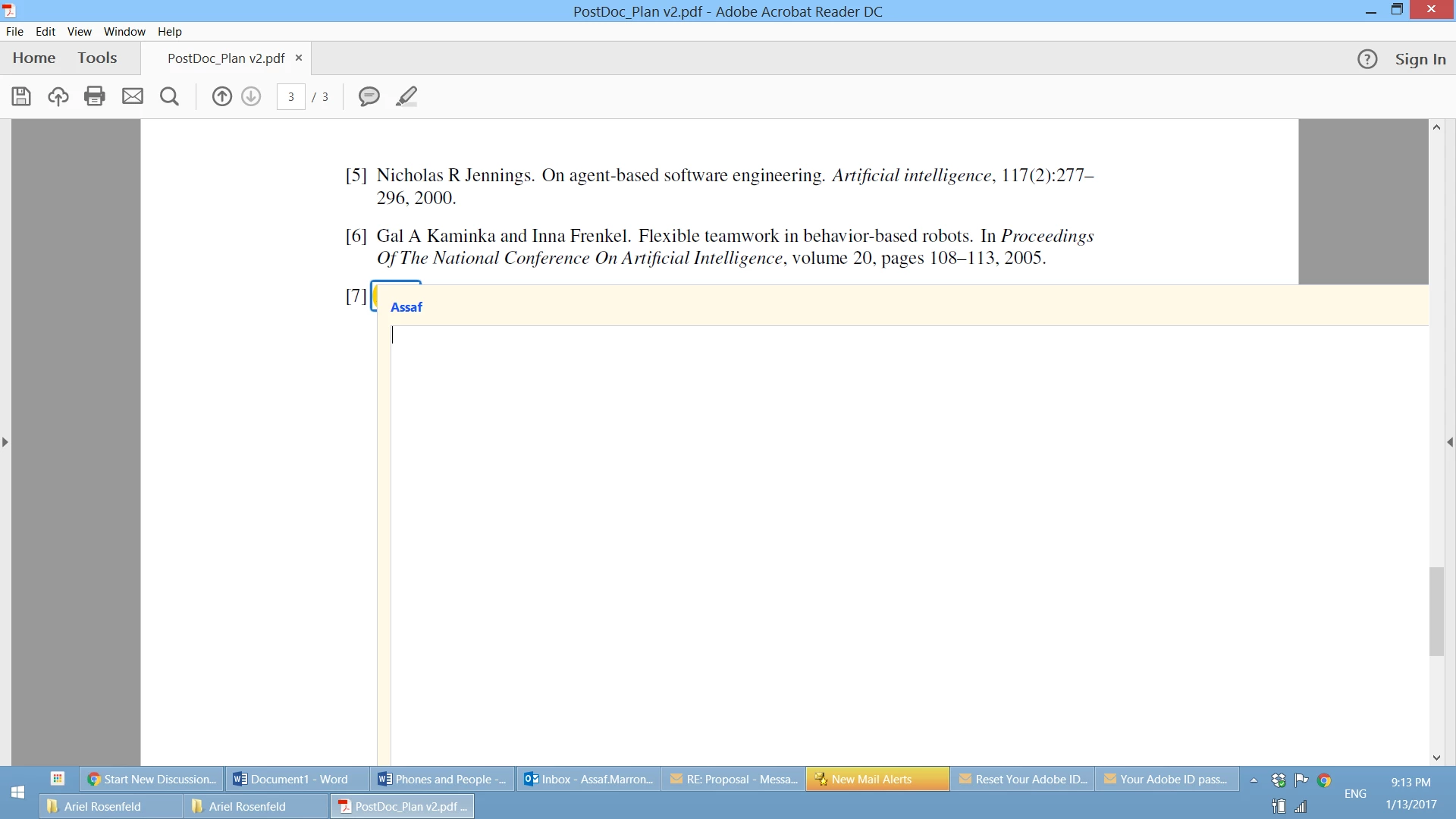
When i open POPUP - half the screen or more is covered with the text entry field/form.
I don't see a CLOSE/POST button. I cannot scroll this window to the right. I cannot continue working with the document.
Thank you very much for any solutions or bypasses.
My email [personal info deleted by mod, forum policy] - if you answer - kindly send me an email - when i have asked this last year, i did receive an initial answer but missed it for several weeks. since i found a bypass - i didnt follow up then.
Thank you,
Assaf Marron
 AdChoices