
Participant
September 10, 2024
Answered

Highlighting in new Acrobat Pro

  • September 10, 2024
  • 2 replies
  • 2005 views

Hi all,

I am test-driving the new UI and reserving judgment for now....

However, one issue I have noted relates to highlighting text.  It seems that the options in terms of colours are restricted compared to the classic UI.  Am I missing something?

Any help gratefully received.


Kind regards


Simon
This topic has been closed for replies.
Correct answer Rohit AnandT3

Hi @simont43406312 ,

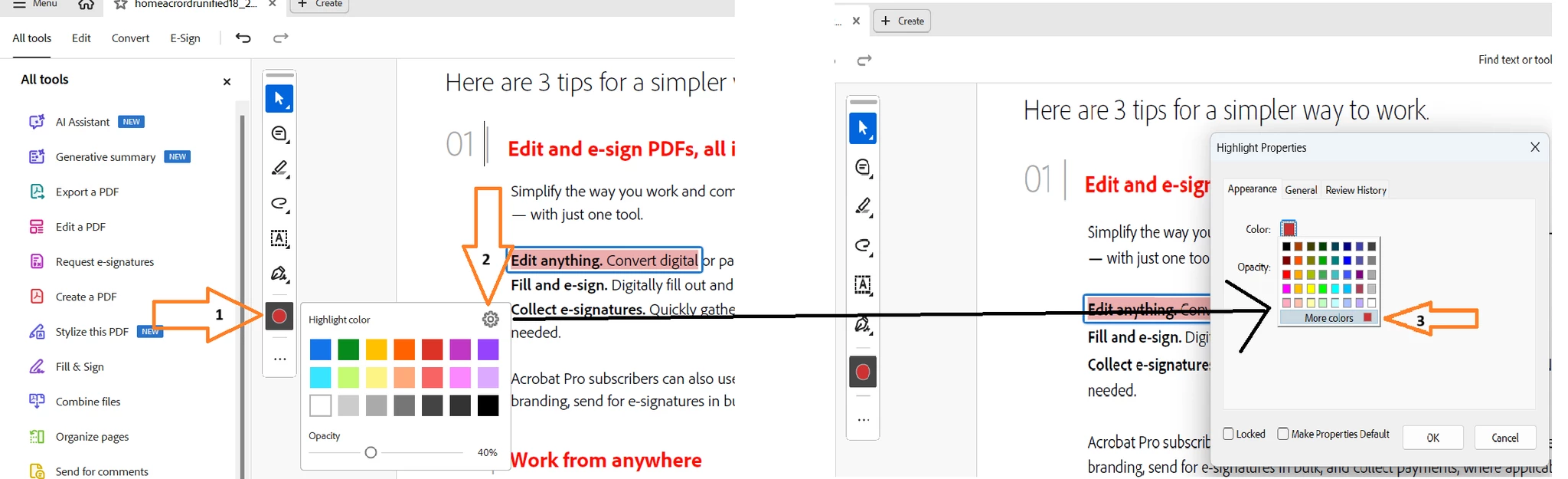
The extended color options for Highlight text are available under the Quick tools menu -> Color picker(see attached screenshot).


Hope this helps.


Thanks,

Rohit

[Moderator: Added Screenshot in the reply itself]

2 replies

Participant
October 29, 2024

I have to agree with Barbara and Simon. Not having a pop out style properties tab, makes us have to go through multiple screens to use our custom colors. I often use my highlights to categorize information as I study and research. It really would be great to have that as an option.

Adobe Employee
October 30, 2024

Thank you for your feedback, the issue has been rasied to the concerned team. Will get back to you once this issue is resolved.


Thanks,

Rohit A

Rohit AnandT3Correct answer
Adobe Employee
September 11, 2024

Hi @simont43406312 ,

The extended color options for Highlight text are available under the Quick tools menu -> Color picker(see attached screenshot).


Hope this helps.


Thanks,

Rohit

[Moderator: Added Screenshot in the reply itself]

Participant
September 11, 2024

Thanks, Rohit,


I can make this work following the steps you have suggested, but it feels very clunky versus the classic UI.

Adobe Employee
September 12, 2024

Glad to know that it worked!

However, i would like to understand the issue further when you say "feels very clunky versus the classic UI". If possible can you please share a video of the workflow along with the issue.


Thanks in advance.

Rohit