
Participant
April 12, 2024
Question

Highlighting sections and not text

  • April 12, 2024
  • 1 reply
  • 626 views

The highlighting tool is highlighting a section of text within the entire page, rather than just a phrase within a sentence.  How do I fix this?  I have tried saving the PDF as another PDF/print to PDF and this is still happening.  see screen snippet:
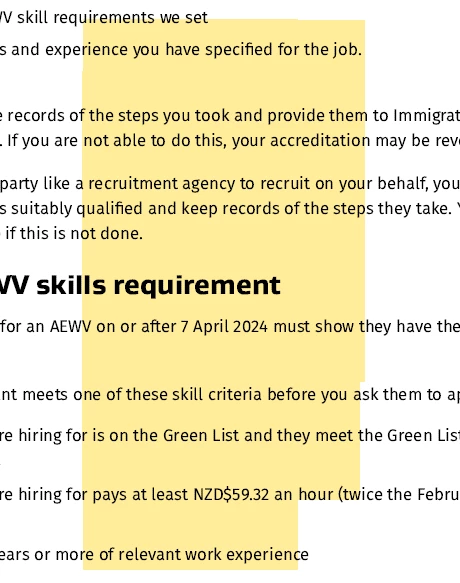
Thanks in advance for your help

This topic has been closed for replies.

1 reply

try67
Community Expert
Community Expert
April 12, 2024

You'll need to re-create the file, as that one has an incorrect structure.

To do so export all pages to a high-resolution image format (such as PNG), then create a new PDF file from those images and run Text Recognition on it.

Participant
April 15, 2024

Thanks for your suggestion.  I followed that process - seems counterproductive to what I believed Adobe Pro could achieve.  I have previously used Foxit and that had no issues with printing web pages to PDF and highlighting.  For now,  I will have to stick with screen snips and highlighting that way for quick notes 😞

Participant
April 15, 2024

downloaded a free trial of Foxit and this is what I was able to do with the same webpage without issue.  I am disappointed that Adobe can't do this.  I used to think it was the best tool for PDF files - hence why I have had a personal licence for years.  My previous employer introduced me to Foxit.