
Inspiring
July 11, 2022
Answered

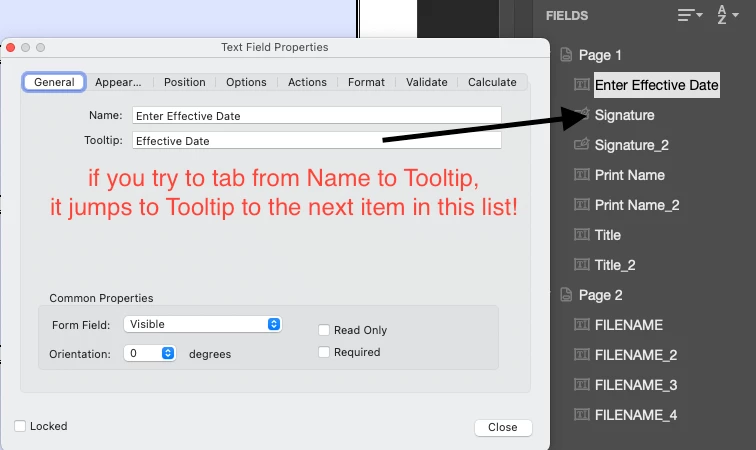
Hitting tab in the Properties window jumps to the next Form Field item, not the next entry??!!?

  • July 11, 2022
  • 3 replies
  • 5134 views

I'm building a form and I need to customize the Name and Tooltips under Properties/General. I'll enter the Name on the first Field, copy/paste this, hit the tab key to jump to the Tooltips field but instead Acrobat jumps to the Tooltips in the next Field created in the list (Signature). Even if I click in the Tooltip field, it jumps to the next one. If I'm on any other tab in Properties - Appearance, Position, Options, etc - the Tab key works and jumps to the next entry inside that as it should. This is extremely frustrating to create forms with.

Also, how did Command + ~ to jump to another open Acrobat document get turned off?? 
This topic has been closed for replies.
Correct answer Local Sunrise

Hi @Local Sunrise ,


Maybe the text fields have the same field names, making them behave as an exact duplicate field object.


Can you confirm if that gets resolved by changing the field names?


Apologies for my delay! I figured out you can name every box as a label so once I did this, it fixed the issue. Phew! Thanks again. 

3 replies

Participant
May 6, 2024

@EJ Salerno,

Did you ever get this figured out? I'm having the same exact problem and it's terribly frustrating.

Thanks!

esalerno
Participant
May 7, 2024

Nope. It is still happening and very annoying. In any other tab menu under the Properties (Appearance, Position, Options, Actions, etc.) hitting the TAB key jumps to the next selection, but only under General does it not jump from Name to Tooltip. 

Still doing it in Adobe Acrobat Pro (Continuous Release, Version 2024.002.20736), macOS Sonoma 14.4.1

ls_rbls
Community Expert
Community Expert
July 15, 2022

Is this happening with only the document that you're working with or with every PDF that you build from scratch?


Also, which operating system are you on and which version of Acrobat?


And If you right click on any part of the open document and select "Document Properties". See under the "Description" tab the section labeled: Advanced -->>> "PDF Producer". What was the source document used to produced that PDF?

ls_rbls
Community Expert
Community Expert
July 15, 2022

As to how to switch between opened document it doesn't use the CTRL + keyboard combo.


You should use ALT+SHIFT+W which is the keyboard shortcut to open the "Window"  menu on the main toolbar. 


Once the context menu opens up the opened documents are listed by numerical order 1, 2 ,3 etc with the file name corresponding to that tabbed document.


Just hit the desired number on your keypad that corresponds to the document you want to switch to.


NOTE: This works in both cases wether the documents are grouped in tabs side by side inside of the main working window or opened on separate windows.

Inspiring
July 15, 2022

So a common keycommand that's in Illustrator, Photoshop & InDesign is not applicable to the same Adobe program? That makes it sound like Acrobat isn't even part of the Adobe family. And even to call the keycommands "single key accelerators" instead of "keyboard shortcuts"? That's poor programming & design IMO.

BarlaeDC
Community Expert
Community Expert
July 12, 2022

Hi, 


if you think it is a bug then you could check here to see if it has already been logged and if not log it yourself.


 https://acrobat.uservoice.com/


Please note this is no guarentee that it will be fixed.

Inspiring
July 15, 2022

I think I have, twice.