

Participant
August 19, 2026
Question

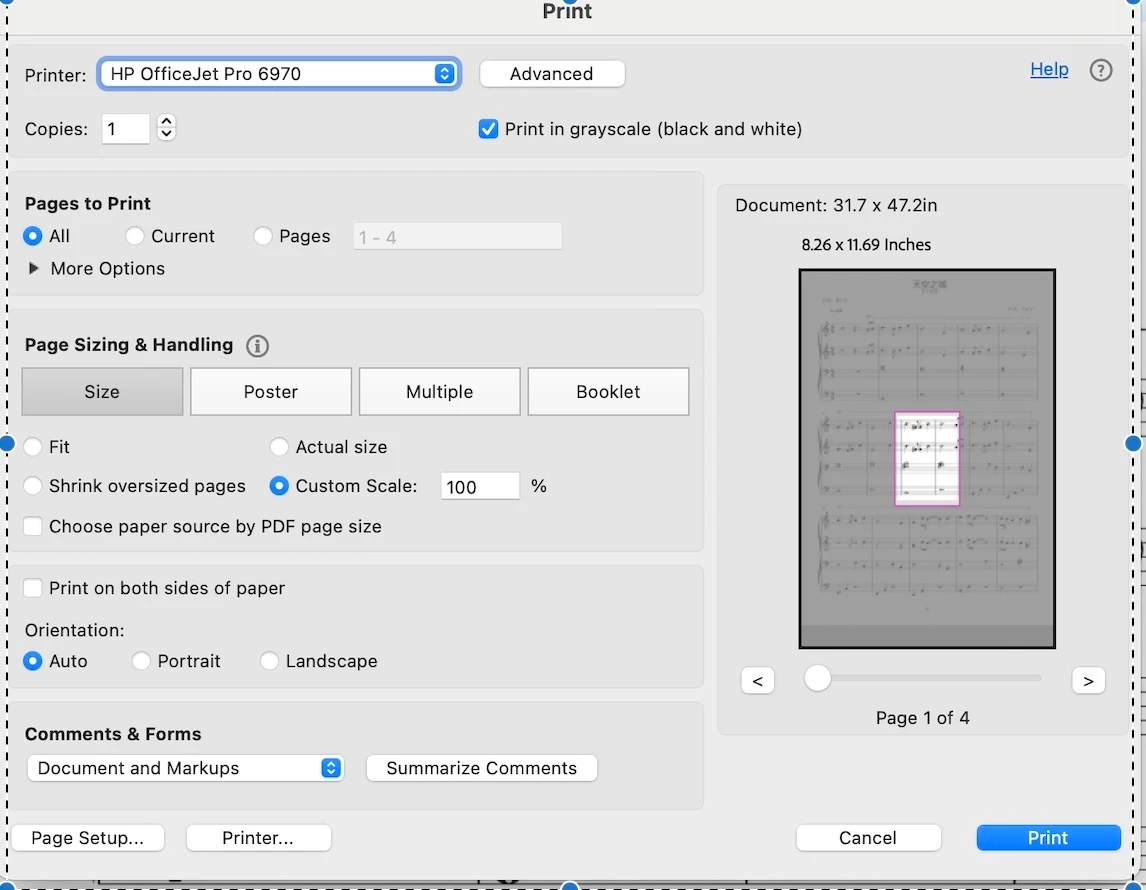
How can I adjust the custom scale of my PDF during print? I want to increase the print area size but there is a purple rectangle locked area in my print preview.

  • August 19, 2026
  • 5 replies
  • 23 views


    5 replies

    Participant
    August 20, 2026

    Hi Karl and Amal, 

    Thank you for your prompt replies. 

    The “Fit” options works fine but my printed document looked quite small. When I tried to adjust custom scale so my document can appear to fit a A4 paper, the purple box appeared again. Previously, I didn’t have this issue. Wonder if there is anything I’ve clicked wrongly. Hope to resolve it soon! 

    Karl Heinz  Kremer
    Community Expert
    Community Expert
    August 20, 2026

    When you select a custom scale, you also have to change the scaling factor: In your screenshot it is set to 100%. Does the box show up with you select e.g. 24%?

    The “Fit” option takes the printers non-printable margins into account. There is a good chance that when your document shows that it would use the whole page, including these margins, that your final print-out would be incomplete. 


    Karl Heinz  Kremer
    Community Expert
    Community Expert
    August 20, 2026

    BTW: You have to hit the tab key after you change the scaling factor so that it gets applied. 

    Karl Heinz  Kremer
    Community Expert
    Community Expert
    August 19, 2026

    Your PDF page is 31.7x47.2in, so way too large to print o your HP printer. What happens when you select the “Fit” option? Or, if you select e.g. 24%? 

    Amal Jaiswal
    Community Manager
    Community Manager
    August 19, 2026

    ​Hi @Enchanted_dancercc2d

    Hope you are doing well, and thanks for reaching out. We are sorry for the trouble you are experiencing.

    Looking at your screenshot, that pink box isn't a printer margin limit; it's Acrobat highlighting the "Current View," meaning it thinks you only want to print the specific area you were zoomed into when you opened the Print dialog, not the full page.

    A couple of things to confirm:

    - Before you opened Print, were you zoomed in on that section of the score?

    - In the Print dialog, if you expand "More Options" under Pages to Print, is "Current View" selected?

    Here's what should fix it:

    1. Close the Print dialog, zoom out so the full page is visible in Acrobat (Ctrl/Cmd+0 for Fit Page, or Ctrl/Cmd+1 for Actual Size), then open Print again. The highlighted box should now cover the whole page.

    2. Or, in the Print dialog, expand "More Options" under Pages to Print and switch it from "Current View" to "All Pages" (or whichever page range you need) that removes the zoomed-region restriction entirely regardless of your current zoom level.

    3. Once that's set, use Custom Scale or Fit under Page Size & Handling as normal; that setting controls the print size, not which region of the page prints.

    You can see the full breakdown of these print options here: https://adobe.ly/4xjFy0v 


    Let us know how it goes.

    ~Amal
