einatm
Participant
July 30, 2018
Beantwortet

How can I create a single pdf of my whole website, which has a password?

  • July 30, 2018
  • 1 Antwort
  • 323 Ansichten

I know this questions was asked, and not answered, 2 years ago.  Trying my luck.
Dieses Thema wurde für Antworten geschlossen.
Beste Antwort von Nancy OShea
  1. Go to your website's URL in a browser. 
  2. Log-in as required. 
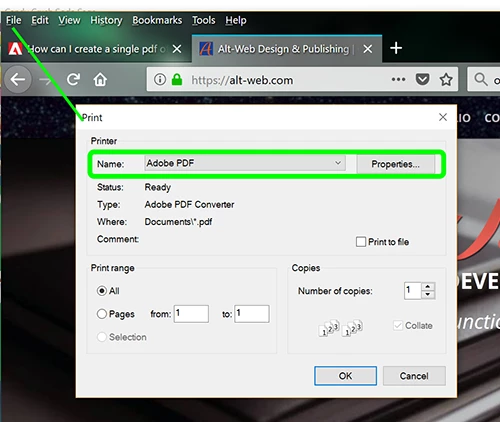
  3. Go to File > Print and select Adobe PDF as your printer.   See screenshot.
  4. Go to the next URL in your site and repeat step 3.   Repeat step 3 as needed for each site page.

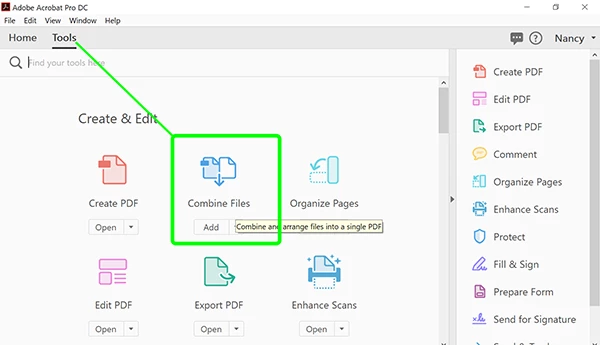
5.  Open Acrobat Pro DC and click on Tools.  Select Combine Files.
1 Antwort

Nancy OShea
Community Expert
Community Expert
July 31, 2018
  1. Go to your website's URL in a browser. 
  2. Log-in as required. 
  3. Go to File > Print and select Adobe PDF as your printer.   See screenshot.
  4. Go to the next URL in your site and repeat step 3.   Repeat step 3 as needed for each site page.

5.  Open Acrobat Pro DC and click on Tools.  Select Combine Files.

Nancy O'Shea— Product User & Community Expert