Participating Frequently
November 14, 2017
Answered

How can I edit and arrange pages in a PDF as shown below?

  • November 14, 2017
  • 1 reply
  • 1925 views

So basically, I have one 90+ page PDF where each page alternates front and back, designed to be printed double sided. I'd like to rearrange these to print 4 per page, and then cut them out so they'd be about 1/4 the original size. Please see picture for example:
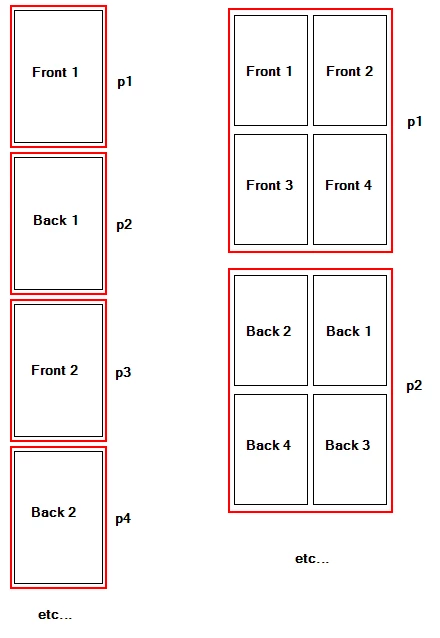
The left side is what I currently have. The right side is what I'd like to have. As you can see, I'd like to have them arranged so that when I print double sided, I can cut them out and have the Front 1 and Back 1 on the same physical piece of paper.

How can I accomplish this in Acrobat?

Let me know if I didn't explain the best, I can try do better!

Thanks in advance.
This topic has been closed for replies.
Correct answer Bilal Ansari

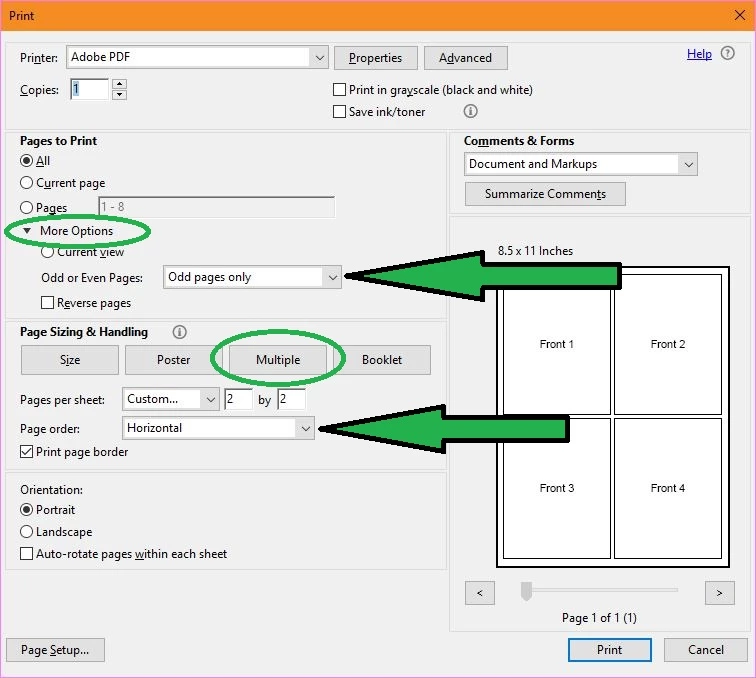
It's better to use the authoring application for such cases but, have you tried Print ?

You can use the following settings:

- For front: "Odd pages only" and "Horizontal" order.

- For back: "Even pages only" and "Horizontal Reversed" order.

1 reply

Bernd Alheit
Community Expert
Community Expert
November 14, 2017

Possible with following plugin:

Quite Imposing: home page

shaun_zAuthor
Participating Frequently
November 14, 2017

Looks interesting.. Do you know what the limitations of the demo are? This is only a one time thing, so I'd rather not put much $$ into it right now.

I also have the original InDesign file that was used to create it, so I guess I could ask over on those forums as well, just was hoping it'd be pretty straight forward with Acrobat!

Bilal Ansari
Community Manager
Bilal AnsariCommunity ManagerCorrect answer
Community Manager
November 16, 2017

It's better to use the authoring application for such cases but, have you tried Print ?

You can use the following settings:

- For front: "Odd pages only" and "Horizontal" order.

- For back: "Even pages only" and "Horizontal Reversed" order.