
How can signer 2 bypass fields required or not in a fill-in form?
Q. How can I avoid Signer 2 and Signer 3 from tabbing through the form?
==========
Hi,
I created a form that is industry standard in the home healthcare industry. However, it requires 3 signers. The form only requires Signer 1 to fill-in the form where applicable. I did not make the fields required for Signer 1 or 2 or 3.
Here is how the form will work if done manually:
Signer 1 will complete the following fields:
- Week Starting
- Patient Name
- Caregiver Name
- Start date
- Time Clock in Clock out
- Total hours worked
- Areas of service where applicable to patients care. (Not all fields will be checked)
- Caregive Initials
- Care Provider E- Signature block and date
- Deliver form to Next Signer
Signer 2 will complete
- Patient Client Initials
- Client's E-Signature and date
- Deliver form to next signer
Signer 3
- Supervisor's E-Signature and date
- Deliver form to sender
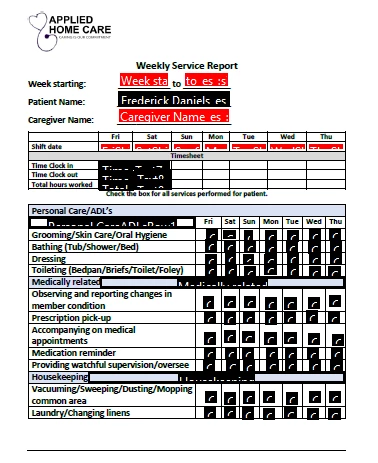
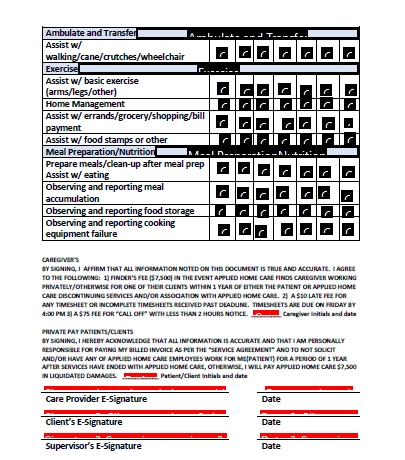
Everything is working except . . . Signer 2 and Signer 3 have to click through the entire form to get to fields that apply to his/her role.
Q. How can I avoid Signer 2 and Signer 3 from tabbing through the form? Signer 2 and Signer 3 only have specific areas to sign. They need to see information that Signer 1 completed.
 AdChoices