moriahm26787418
Participant
November 15, 2016
Answered

How do I change the size of the file in terms of Page size?

  • November 15, 2016
  • 1 reply
  • 1198 views

I made a cookbook and have found a company to turn it into a real book, bound and all. But they ask that the pdf file has a page size of 8.5 x 11. The size is currently 17.73 x 24.86. How do I change it to 8.5 x 11?

I have Adobe Acrobat Pro DC.
This topic has been closed for replies.
Correct answer Karl Heinz Kremer

In Acrobat Pro DC you can use a "Preflight" fixup to modify the page size. Open up Preflight, and then select the "Single Fixups" category:

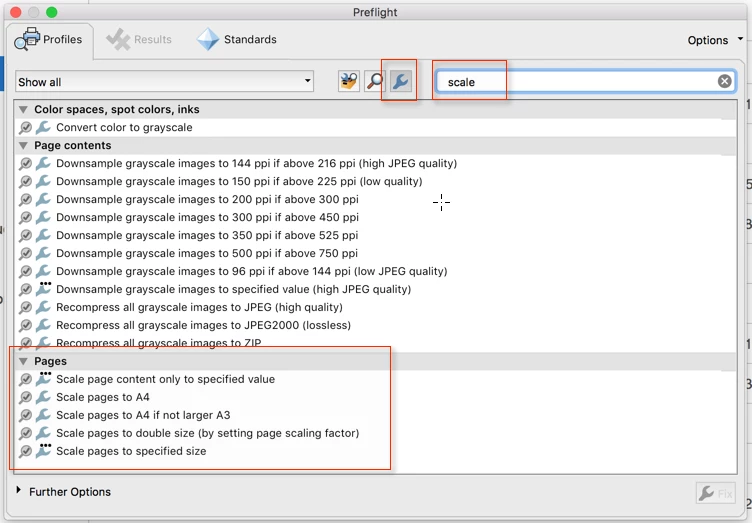
Then search for the term "scale", and you will find a number of scaling options. If none of them works for you, you can copy e.g. the "Scale pages to A4", rename and and modify it to scale the document to your desired page size.

1 reply

Karl Heinz  Kremer
Community Expert
Karl Heinz KremerCommunity ExpertCorrect answer
Community Expert
November 15, 2016

In Acrobat Pro DC you can use a "Preflight" fixup to modify the page size. Open up Preflight, and then select the "Single Fixups" category:

Then search for the term "scale", and you will find a number of scaling options. If none of them works for you, you can copy e.g. the "Scale pages to A4", rename and and modify it to scale the document to your desired page size.

moriahm26787418
Participant
November 15, 2016

But how do you get to Preflight? is it already in Acrobat or is it something else i need to download?

moriahm26787418
Participant
November 15, 2016

Never mind. I found Preflight. Just had to search it in tools. thank you so much.