


Participant
June 16, 2026
Question

How do I do my usual scanning in Adobe with my new HP OfficeJet Pro 9730e?

  • June 16, 2026
  • 4 replies
  • 11 views

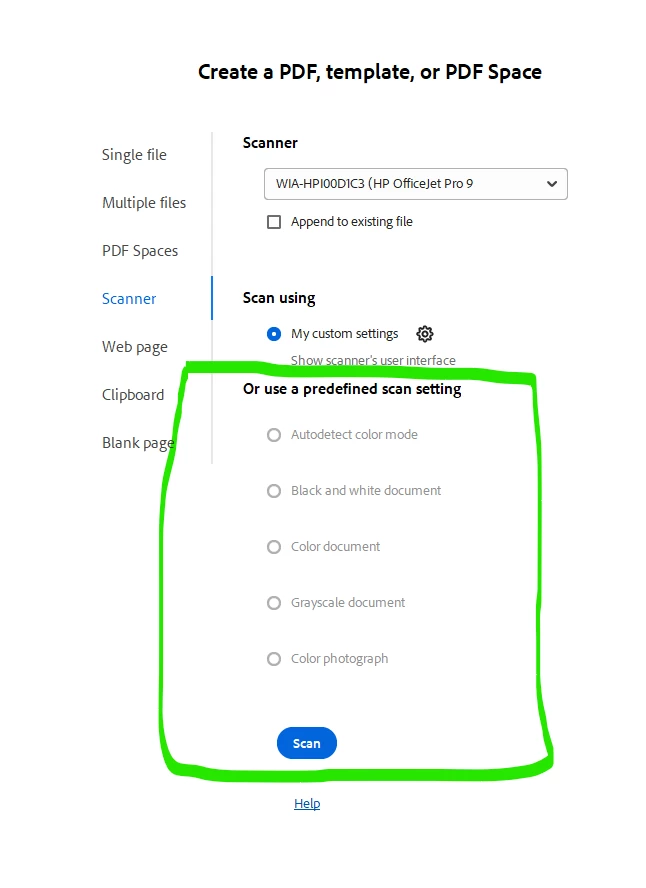
Hi - got a new printer (HP OfficeJet Pro 9730e) and I cannot do my usual scanning through Adobe with the Adobe menu. I can use the scanner’s native user interface which brings up the very simple (small) scanning window, but I don’t want that.


I want to use the green area below - and it won’t work. What can I do to do this once again? Thank you.
 

4 replies

Participant
June 20, 2026

Okay - this is what I get when I try to install the full software pkg with scanning software:


Participant
June 20, 2026

Thanks for getting back to me so quickly - and I apologize for my tardy response. Meanwhile…

The scanner is built into the printer: HP OfficeJet Pro 9730e

And, Acrobat Pro, 2026.001.21662, 64 bit


And, yes, it is ONLY doing WIA. For some reason I couldn’t find the TWAIN driver. But, I’ll go look. I will see if I can find the TWAIN one. Wish me luck...David C.

Anand Sri Bhattacharya
Community Manager
Community Manager
June 16, 2026

Hello!!


I hope you are doing well, and thanks for reaching out.


++ Adding to what our Adobe employee has shared, please try those suggestions and let us know how it goes.


Could you please update the user profile name? The current one displays your email address, which is not suitable for a public platform where personal information should not be shared.


Please click on your user profile name on the top right corner of the community page, go to my profile, and select edit profile. And make changes to the user profile name.

You can also make changes from the Adobe account profile here: https://account.adobe.com/profile


Once done, please confirm here.

Thanks,

Anand Sri.

Participant
June 20, 2026

Did I do it correctly?

Amal Jaiswal
Community Manager
Community Manager
June 16, 2026

Hi there,

Hope you are doing well and thank you for reaching out, and I’m sorry for the trouble you're experiencing.

When the predefined scan settings in Adobe Acrobat appear inactive or greyed out, it is often because the scanner is using a WIA (Windows Image Acquisition) driver instead of a TWAIN driver. In some cases, the scanner may also be set to use its own native scanning interface, which can prevent Acrobat from enabling those options.

As a troubleshooting step, please check which driver your scanner is using. If a WIA driver is selected, try downloading and installing the latest TWAIN driver from your scanner manufacturer's website. After installing it, restart Acrobat and test the scanning options again.

You may also check the solution shared in this community discussion:
https://adobe.ly/4eqSglX


Also, it will be good to know:

  • What scanner model are you using?

  • Which version of Acrobat are you using?


We'll be happy to help further once we have more details.


Regards,
Amal