Participant
March 23, 2026
Answered

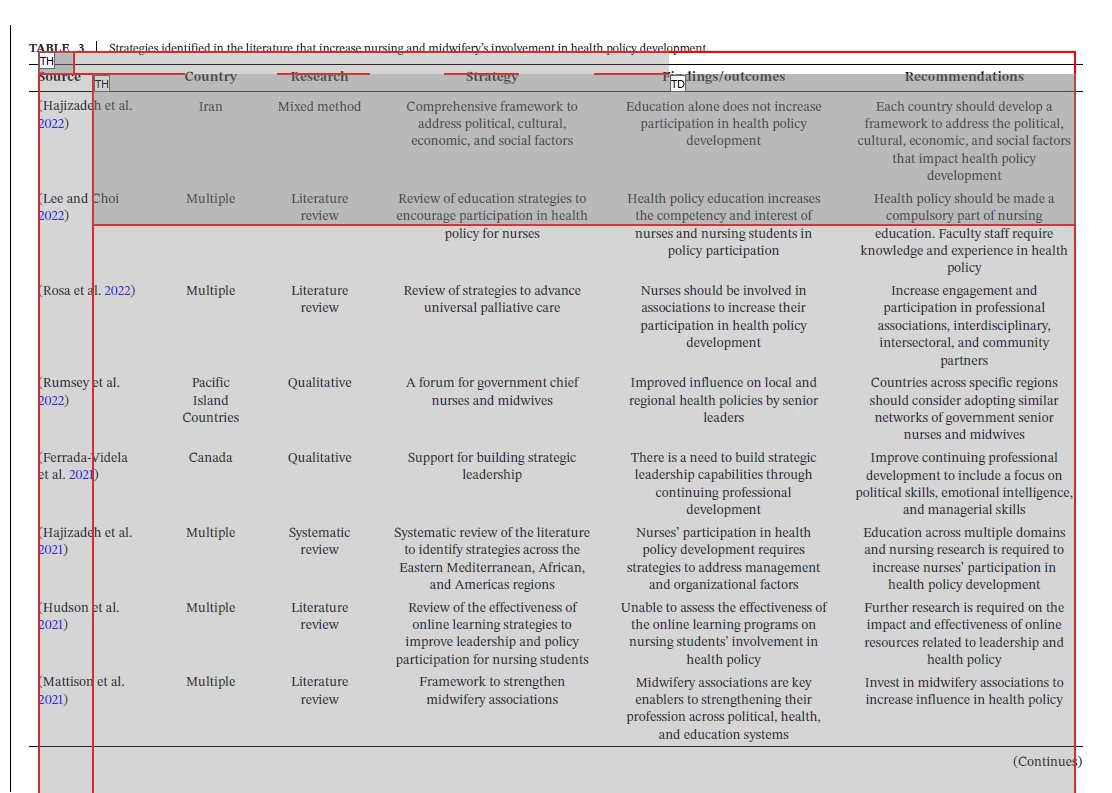
How do I edit a table's scope when the Table editor is showing overlapping fields?

  • March 23, 2026
  • 1 reply
  • 17 views

When I try to go into Fix Reading Order>Table Editor to set the table’s scope and adjust column/row spans, the cells are not displaying correctly and I can’t edit any of them. The table was in landscape mode, and it won’t adjust or change even when I rotate the table. 


Screenshot of Table’s cell property options. 

How can I set the scope?

    Correct answer Tariq Dar

    Hi ​@lindsay_3411


    Thank you for sharing the file and the detailed description of the issue. We understand how frustrating it can be when Table Editor does not display or allow cell editing as expected.


    After reviewing the document, the table appears to be a complex structure with multiple columns and likely merged cells. In Acrobat, while it is possible to define header scope and adjust row and column span using the Table Editor or the Tags panel, these controls may have issues with such complex tables.


    In such cases, you can try the following:

    1. Open the Tags panel and review the table structure under the Table tag to ensure that rows and cells are correctly defined as TR, TH, and TD.

    2. For header cells, open Properties and confirm that the appropriate scope, such as Row or Column, is set.

    3. For merged cells, check and adjust RowSpan and ColSpan attributes where applicable.


    Even though these options are available in Acrobat, complex tables may not render correctly in the Table Editor, and the editing experience can remain limited.


    We can also try the workaround, which is usually helpful in such scenarios: 

    1. Create a copy of your document
    2. Launch Acrobat > Menu > Preferences > Accessibility > Other Accessibility options
      1. Check “Enable Cloud-based auto-tagging” for accessibility
      2. Click Ok 
      3. Relaunch Acrobat (optional)
    3. Open the document > Tools > Prepare for Accessibility 
      1. Click “Automatically tag PDF.”
      2. Once done, save the document and check. 


    If the issue persists after verifying the structure, the recommended approach is to recreate or simplify the table in the source application, such as Word or Excel, and then export it again as a tagged PDF. This typically provides a more stable and editable table structure in Acrobat.


    Please share the Acrobat version and how the PDF was created. We would be happy to take a closer look and help you in any way we can.


    ~Tariq

     

    1 reply

    Tariq DarCorrect answer
    Legend
    March 24, 2026

    Hi ​@lindsay_3411


    Thank you for sharing the file and the detailed description of the issue. We understand how frustrating it can be when Table Editor does not display or allow cell editing as expected.


    After reviewing the document, the table appears to be a complex structure with multiple columns and likely merged cells. In Acrobat, while it is possible to define header scope and adjust row and column span using the Table Editor or the Tags panel, these controls may have issues with such complex tables.


    In such cases, you can try the following:

    1. Open the Tags panel and review the table structure under the Table tag to ensure that rows and cells are correctly defined as TR, TH, and TD.

    2. For header cells, open Properties and confirm that the appropriate scope, such as Row or Column, is set.

    3. For merged cells, check and adjust RowSpan and ColSpan attributes where applicable.


    Even though these options are available in Acrobat, complex tables may not render correctly in the Table Editor, and the editing experience can remain limited.


    We can also try the workaround, which is usually helpful in such scenarios: 

    1. Create a copy of your document
    2. Launch Acrobat > Menu > Preferences > Accessibility > Other Accessibility options
      1. Check “Enable Cloud-based auto-tagging” for accessibility
      2. Click Ok 
      3. Relaunch Acrobat (optional)
    3. Open the document > Tools > Prepare for Accessibility 
      1. Click “Automatically tag PDF.”
      2. Once done, save the document and check. 


    If the issue persists after verifying the structure, the recommended approach is to recreate or simplify the table in the source application, such as Word or Excel, and then export it again as a tagged PDF. This typically provides a more stable and editable table structure in Acrobat.


    Please share the Acrobat version and how the PDF was created. We would be happy to take a closer look and help you in any way we can.


    ~Tariq