


How do I enable "insert space icon" when inserting a space in comments using Acrobat Pro Enterprise?
Hi
I have Acrobat Pro, Enterprise edition, up to date installation. Continuous release version 2025.001.20630, 64 bit, Comments api version 25.1.20630.0, running on Windows 11 as an installed app on my computer. When a coauthor inserts a space using the insert text comment on their Acrobat, it looks like this, which is very clear! The compositors know to insert a space!
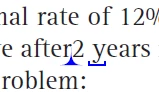
However, when I insert a space using my commenting insert text, it looks like this:

without the ending underscore--yes, I have typed a space in the commenting dialog box. The same goes for inserting a new line and the paragraph mark. According to all the online Acrobat help I've found, my installation's insert icons should look like the top picture, not the bottom one, when I insert a space. How do I fix this? It's confusing for the compositors when I have to insert a space since they go to the comment box and all there is is blank space.
I've tried switching between the old and the new versions and that didn't help. I can't find anything in the preferences that makes a difference.
Thanks
 AdChoices