Participating Frequently
September 19, 2017
Answered

how do I 'flatten the image' in my pdf?

  • September 19, 2017
  • 2 replies
  • 8078 views

I'm on an iMac, os el capitan using acrobat dc. I'm having problems with a pdf file I need to print. When I send to the print shop they get back in touch saying the graphic at the bottom won't print unless I 'flatten the image.' How do I do this? Thanks

This topic has been closed for replies.
Correct answer Dov Isaacs

trying a different way to share my pdf file here


OK.

I've downloaded your file. It is a PDF 1.6 file directly exported from the latest InDesign version.

I had absolutely no problem whatsoever printing this PDF file to a PostScript printer. All content printed!

HOWEVER, in examining the file, I did find a major issue. Seven Pantone spot colors are defined and actually used in this artwork:
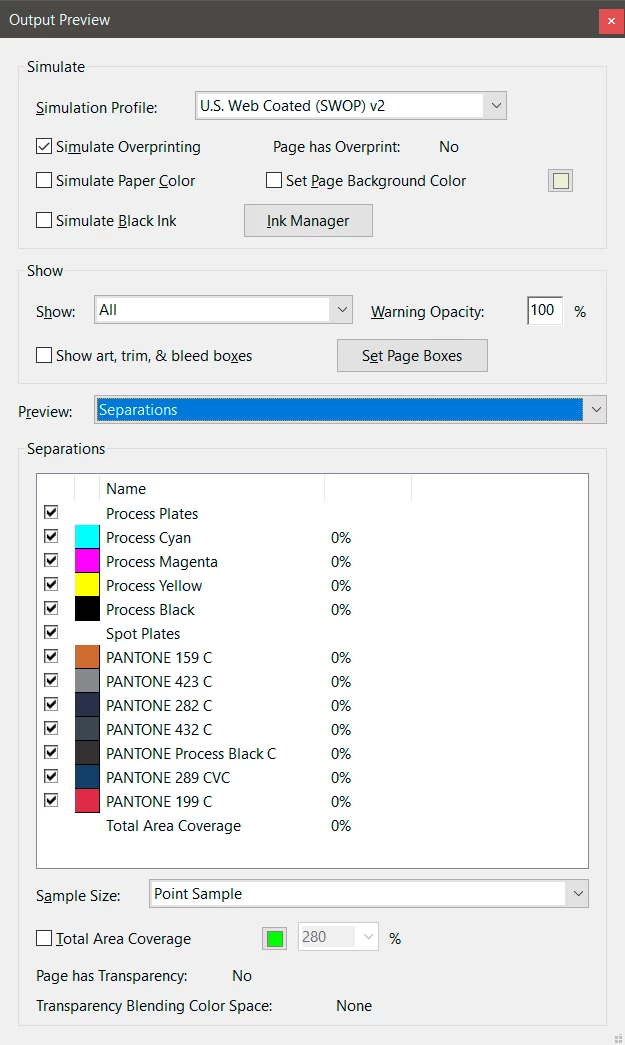
This artwork is absolutely not going to be printed on an eleven ink press! Spot colors are being used here as an inappropriate convenience. At best, when exporting the PDF file, the Ink Manager should be set to convert all spot colors to process.

What may be happening is that the RIP in question is rejecting such an absurd use of spot colors. Of course, the prepress operator should be able to adjust settings in the RIP or to easily fix the PDF file to force all that spot color use to process. But really, the designer should take some reasonable responsibility here! 

          - Dov

2 replies

Dov Isaacs
Legend
September 19, 2017

Plus there are any number of types of “flattening” that are possible. For example, there is transparency flattening, layer flattening, annotation flattening, or even converting an entire PDF file into a big honk'in raster image is sometimes referred to as “flattening.”

Unless “the graphic at the bottom” was an annotation, any competent print service provider should be able to print content such as you've shown without any special considerations. And even if the content was an annotation, any competent print service provider could/should be able to accommodate that!

If you want to post this PDF file or a page of it, we can take a look at it and confirm our thoughts about this!

          - Dov

- Dov Isaacs, former Adobe Principal Scientist (April 30, 1990 - May 30, 2021)
Miss_MacAuthor
Participating Frequently
September 20, 2017

Thanks for the response. I have to use this particular printer as it's part of the university I am employed by. Have tried to attach the PDF, which is only 174kb, but get the message below:

Leanne

Legend
September 20, 2017

You can't attach a PDF to the forum. You have to share it somewhere and post the URL.

Legend
September 19, 2017

They are clutching at straws, because their equipment isn't working. If they knew what to do, they would do it! Find another printer.

Miss_MacAuthor
Participating Frequently
September 20, 2017

yeah, I think so too, sadly i'm bound to use them as they're part of the Uni which employs me