Jackiepidan
Participant
January 28, 2026
Question

How do I get rid of the AI-generated image description?

  • January 28, 2026
  • 7 replies
  • 1223 views

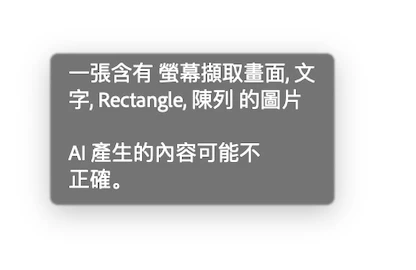
When I hover my pointer on top of a page this annoying box pops up and show me the ‘summary’ of the page, how do I get rid of it?

I have already turned off the ‘Generative AI’ preference, and it was no use.

    7 replies

    JS45946200
    Participating Frequently
    April 28, 2026

    OMFG I THINK I FIGURED IT OUT!!!

    My original document was created in InDesign, then exported to PDF. I went back to the original and I turned off generative AI for InDesign, and rebooted, but it still kept showing generative AI Alt-text descriptions for my images, which then propagated to the PDF I exported. Turned off Generative AI in Acrobat but it did nothing to remove the alt-text. 

    So I went back to InDesign and I poked through alllllll the menus trying to locate whatever was still forcing the AI descriptions on me and this is what I found: 

    There’s a “T” in a circle at the bottom of each image. If you Alt-click that circled T, the alt-text dialog pops up. And there it is: the AI-generated description that’s STILL THERE EVEN THOUGH I TURNED OFF GENERATIVE AI. You can delete it, or add your own text, whatever. Then click Done. That removes the AI text. 

    But here’s the thing, I can’t find a way to do a global erase of the AI generated alt-text. You have to do it for EVERY IMAGE IN YOUR DOCUMENT.

    One at a time.

    For, in my case, HUNDREDS OF IMAGES. (This is how I’m going to be spending the rest of my day.)

    Then, save and export the cleaned document to PDF and the popups are finally gone. 

    Thanks, SO MUCH, Adobe, for adding this super useful time-suck “feature” to my workflow.

    And for being SO HELPFUL in figuring out a solution in a timely manner.

    It would have been a terrible user experience if I had to poke around in your product, which I’m paying for, and figure it out for myself when I was supposed to be getting MY OWN WORK DONE. 

    Yay. Good times. 

    In case your AI doesn’t catch my tone, that’s sarcasm. It was not, in fact, good times. 😒

    Participant
    April 27, 2026

    100% Agree - Adobe PLEASE stop pushing AI where it was NEVER asked for. It’s as if you assume all users utilize your product the same way? I don’t need AI to tell me about an image I built into my layout - especially if it overrides the comment my client used to request an edit. This is just intrusive, disruptive and useless. This injects unecessary steps into my workflow and furthermore restricts it without a pref to turn it off. Why? Why? Why? For the love of centuries of progress done by human ingenuity - STOP THE AI ALREADY! We don’t always need AI assistance!? Especially in a brand conceived in the spirit of promoting creativity. Please fix this issue.

    Community Manager
    April 28, 2026

    Hi ​@defaulte0fyi6btx6l1

    Thank you for sharing your experience. I understand how frustrating it can be when the application behaves in a way that disrupts your workflow, especially when working with larger or complex documents. 

    Could you try the suggestions mentioned here: 

    If this doesn’t fix it, could you please share a short video of your experience?


    I'm looking forward to hearing back from you. 

    ~Tariq


    Participant
    April 20, 2026

    OMFG! Why Adobe why?! Please just give me a check box in the preferences with the “New Adobe” turned off to make these absurdly useless descriptions go away and never show again. They are pointless in the extreme and were requested or wanted by precisely no one.

    Anand Sri Bhattacharya
    Community Manager
    Community Manager
    April 21, 2026

    Hello ​@Ziggi Browning 


    I hope you are doing well. We apologize for the delayed response and the trouble.


    Could you please share more details about the issue? Are you referring to turning off the New Acrobat UI experience and its availability in the product preferences? 

    If yes, the new UI experience can be disabled from 

    • Windows: Menu (☰) > Disable new Acrobat > Restart
    • macOS: View > Disable new Acrobat > Restart

    Can you share a screenshot of the message/pop-up you get? Are you on a Mac or Windows machine? What is the version of Acrobat/Reader installed? This information will help us investigate further.


    Regards,

    Anand Sri.

    Participant
    April 23, 2026

    This thread is about “How do I get rid of the AI-generated image description?”

    What we desperately want is an option to stop Acrobat showing pop up image descriptions. The descriptions are labelled as “AI generated content”, so naturally we would look under the AI section of the preferences.

    Frustratingly, the Generative AI section of the preferences does not provide a means to turn off the feature. Disabling all Generative AI has no effect on the description pop ups. Nor is there any way to turn it off elsewhere in Acrobat’s settings or menus that I can find.

    Also note that users who have the new Acrobat disabled, for some inexplicable reason, the Generative AI options are removed from the preferences panel.

    mindyb81579837
    Participant
    April 19, 2026

    100% agree. I updated my Acrobat and I still do not have a Generative AI option. Adobe, please stop infusing unnecessary default setting on us!! 

    student5316120
    Participant
    March 6, 2026

    I answered this on another thread: 

    Hope this helps!

    Jackiepidan
    Participant
    January 28, 2026

    Hi ​@AnandSri 
    I’m on a Macbook Pro M4 Pro now, MacOS 26.2 English, and I’m using the desktop version of Acrobat.

    build version of the app
    Generative AI settings

    Thank you very much for you help.

    AnandSri
    Legend
    January 28, 2026

    Hello ​@Jackiepidan 


    I hope you are doing well and thank you for reaching out. Sorry for the trouble you had.


    Could you please share more information about the issue? Are you on a Mac or a Windows machine, and what is the OS version? What is the OS language installed? Are you using the AI services on the Acrobat Desktop app or the Acrobat Online services? 

    What you’re seeing is an AI-generated hover summary that appears in the New Acrobat interface. Disabling “Generative AI” alone does not remove UI elements tied to the New Acrobat experience, which is why the pop‑up is still showing.


    Do you get this with all the PDFs, or is it with one specific PDF? 

    Assuming you are on the latest build of Acrobat: 25.001.21111. Planned update, Jan 20, 2026, please relaunch the app and try with a different PDF. Also, can you share a screenshot of the Generative AI Preferences, like the pic below? 


    We’re here to help, just need more info.

    Regards,

    Anand Sri.


    Participant
    March 27, 2026

    Generative AI is not showing as an option to turn off in my preferences. Also, if anybody actually at Adobe is reading this, AI should NEVER be default on. Let people decide if they want to include it at their own risk.