

December 10, 2025
Question

How do I make Acrobat show only the window on the taskbar?
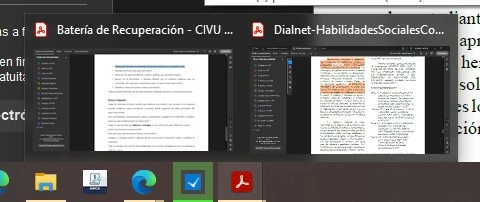
  • December 10, 2025
  • 1 reply
  • 139 views

I have one window with 2 files opened. When I hover or click on the taskbar it shows the two files. I would like it if it only showed the current tab. Is that possible?

1 reply

Randy Hagan
Community Expert
Community Expert
December 10, 2025

Not that I know of. Though I'm curious why you'd want it to be that way.


When you have two files open, you have two tabs in the application window and two "open windows" for open files shown when you hover over the Acrobat icon ... because you have two files open. When you go to the Acrobat applications window, only one document should be showing unless you dragged out one of the tabs to create a second window, or you used one of the View>Tile menu command options to separate the combined application window into two of them. And in that case, all you'd need to do is drag and drop the tab from one window back into the other to create a one-piece, two-tab application window once again.


I guess what I'm really saying is from what I'm inferring you're describing a handy and useful feature, and not a bug. If I've got it wrong, please let me know where and I'm happy to do my best to help you. 


Hope this helps,


Randy