



How do I make Aptos font stop reverting when I unclick rely on system fonts?
I am having a recurring issue with Adobe PDF printing preferences and wanted to see if anyone knows of a permanent fix.
When I try to print to Adobe PDF from Microsoft Office products, the PDF sometimes fails to create and instead produces a log file with the following message:
“Aptos not found, using Courier.”
“Warning: PostScript error. No PDF file produced.”
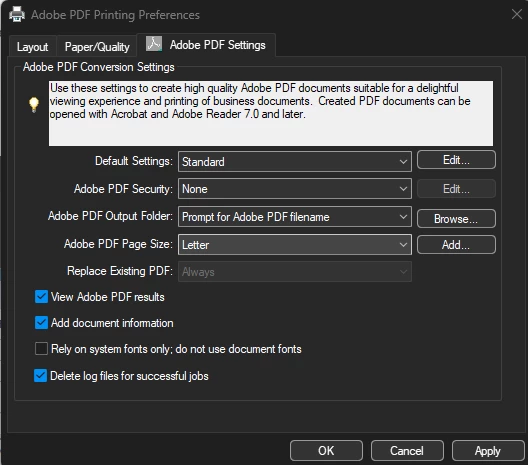
I have found that the issue is fixed if I go into Adobe PDF Printing Preferences > Adobe PDF Settings and uncheck:
“Rely on system fonts only; do not use document fonts”
However, this setting keeps reverting back to checked after a few weeks. I have unchecked it numerous times, but it does not stay that way permanently. I am not sure if it is being reset by Adobe updates, Windows updates, Microsoft Office updates, or something else.
I have been dealing with this issue for several years, and I find it very frustrating that it still has not been permanently fixed. This is not a one-time issue. It is a recurring problem in a paid Adobe product that prevents PDF creation entirely unless I manually change a setting that later reverts on its own.
Aptos is now Microsoft’s default Office font, so I do not understand why Adobe PDF is still failing when documents use that font. I am aware that Microsoft Office has its own built-in “Print to PDF” or PDF export options, but I prefer using Adobe PDF because it has worked better for my workflow when it is functioning correctly.
Has anyone found a permanent fix for this, is there any way to talk to support. All I have found are these forums. I would like to reach out to support can't find a way to.
Specifically, I am trying to determine:
- Why Adobe PDF fails when Aptos is used.
- Why the “Rely on system fonts only” setting keeps turning itself back on.
- Whether there is a permanent fix, registry setting, preference file, update, or workaround to stop this from happening.
- Whether Adobe has a known issue with Aptos and the Adobe PDF printer.
I have attached screenshots of the Adobe PDF setting and the log file showing the error.
Thank you.
 AdChoices