


How do I merge containers within an existing tag?
I have a PDF that I'm attempting to make more accessible. I'm using Adobe Acrobat Pro (Continuous Release | Version 2004.003.20180). I ran the auto-tag function, which did a very good job. But there are some issues I'd like to fix. This document is very simple: just a single column of text divided into paragraphs. The tag and container structure, for most of the paragraphs, looks like this:

But, in some paragraphs, the content is broken up into multiple containers. Here's a typical case, where the first line of the paragraph is in its own container, and the rest of the paragraph is in another one: 
From a scemantic markup standpoint, this bothers me, though, from an accessibility standpoint, it likely doesn't matter. But there are other situations where I suspect it would matter, where some of the containers overlap: 
The H1 tag at the top of this same document--the only thing in it that isn't in a P tag, is a similar case. Rather than having everything in one container in an H1, there are multiple containers, though they don't overlap: 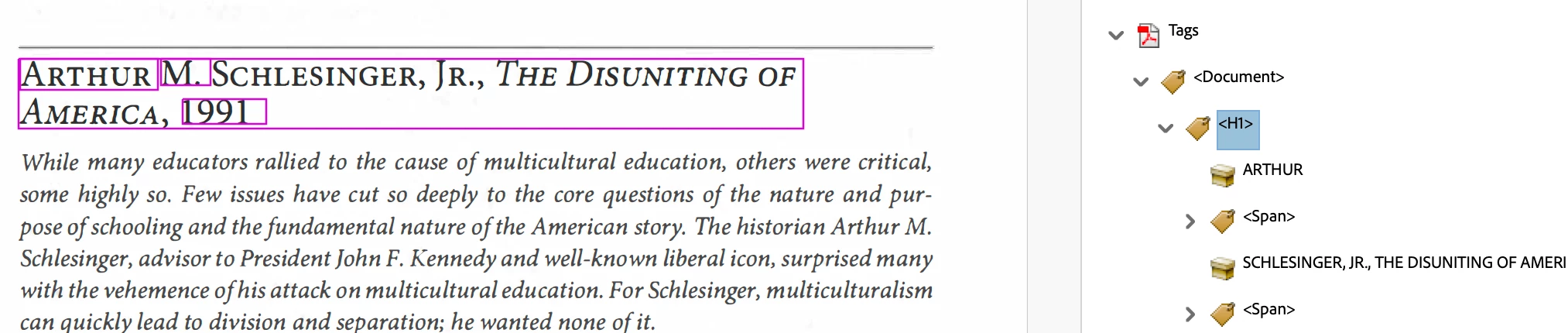
I'm new to Acrobat's accessibility tags feature, but I'm well versed in HTML/CSS/JS. It seems there should be an easy way to merge these containers w/o having to manually retag the entire document. It's tagged mostly very well. But there are a few paragraphs and this H1 that, as far as I can tell, need or would benefit from adjustment.
Thanks for any help you can provide. I haven't found any videos or guides which address this direct problem. I don't have access to the original file, just the PDF.
 AdChoices