dominicfivestar
Participant
October 23, 2018
Answered

How do I move entire lines of a document in Acrobat that already has thousands of check boxes and field entry lines?

  • October 23, 2018
  • 1 reply
  • 1844 views

I recently added check boxes and organized a large pdf document for a client and he now needs an additional line of text to be entered in the middle of the document.  I already tried exporting to word then back after making the revision, but all the check box values are gone.  And to add the text in Acrobat it only allows me to enter into text boxes, not a flowing page like Word does.  I also can't simply hit enter and move all lines down in Acrobat like you can in Word, so what can i do? thanks.
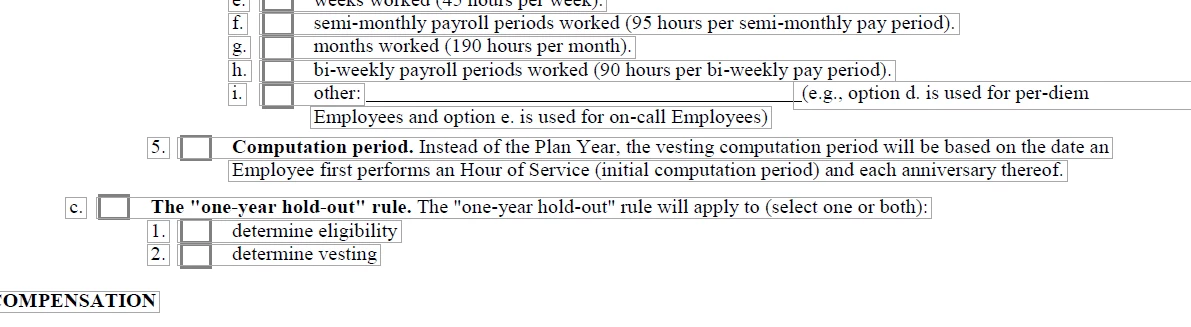
Line "i" needs to include another lines worth of text inside the parenthesis, but its two different text boxes, and how can I make the entire form shift down a line without messing anything up?

This topic has been closed for replies.
Correct answer try67

That's because Acrobat is not a word processing application and PDF files were not meant to be edited in this extensive way.

You need to go back to the original file, make the changes there and then create a new PDF.

Then open the old version and use the Replace Pages command to insert the new ones over the old.

This will keep your fields in tact, but of course you might need to adjust their locations.

1 reply

try67
Community Expert
try67Community ExpertCorrect answer
Community Expert
October 23, 2018

That's because Acrobat is not a word processing application and PDF files were not meant to be edited in this extensive way.

You need to go back to the original file, make the changes there and then create a new PDF.

Then open the old version and use the Replace Pages command to insert the new ones over the old.

This will keep your fields in tact, but of course you might need to adjust their locations.