


Participant
November 30, 2022
Answered

How do I move the quick actions toolbar in Acrobat Pro 2022.003.20281 on a Mac?

  • November 30, 2022
  • 65 replies
  • 194724 views

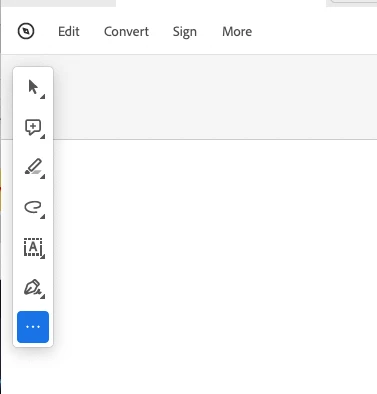
I'm using Acrobat Pro 2022.003.20281 on a Mac OS 12.5. In past versions I could dock the Quick Actions Toolbar to the top of the window, but in this version of Acrobat, it hovers in the upper left, sometimes covering art that I need to see when zooming in. Is there a way to dock it so it isn't hovering, or at least temporarily hide it? The attached image shows how it is "floating" above the window. I need it to not float so it doesn't cover my PDF workspace. Thanks!

 

Correct answer Souvik Sadhu

Hi @Michael C.38448635x8ie @Devyn36647420nuoh,


Hope you are doing well. Thanks for writing in!


Answering Michael, If you hover on the floating toolbar towards the top horizontal bar, your mouse icon should change to a hand tool, and you can move the toolbar to a position that suits you.


Answering Devyn, if you update your Acrobat to the latest version (go to Help-> Check for updates), you should be able to customize the tool bar using the three dots at the bottom of the toolbar (screenshot attached for reference)


If this does not work, please feel free to write back, and we can troubleshoot further.


-Souvik

65 replies

Participant
February 25, 2023

So absolutely annoying - please fix as soon as possible, this is so frustrating

Participant
February 25, 2023

I hate that it can't be docked too. I use the zoom feature alot. Looking to maybe use something else if this can't be fixed.

Participant
February 24, 2023

Replying to document yet another user's frustration with this inflexibility.

Known Participant
February 8, 2023

Hey Adobe, are you going to fix this annoying feature? This "floating" toolbar has to be one of the useless features ever. Please let us rearrange the workspace to get this intrusive thing off of our document.

Participant
July 21, 2023

Still no other solution than to Disable New Acrobat as of today. 

Meenakshi_Negi
Legend
December 1, 2022

Hi Joshua Love,


Thank you for reaching out.


This is the new User Interface behavior. Currently, we do not have any option to move the toolbar. 

We will check with the team if we can remove it or hide it when zooming in on the PDF and will update you.


We appreciate your patience.


Thanks,

Meenakshi


Participant
December 1, 2022

Thanks. I'd appreciate a way to hide it or move it (preferably dock it like before), as it currently slows down some of my work as it is placed now.