Known Participant
June 30, 2022
Answered

How do I output a few PDF pages at 72dpi as images

  • June 30, 2022
  • 2 replies
  • 878 views

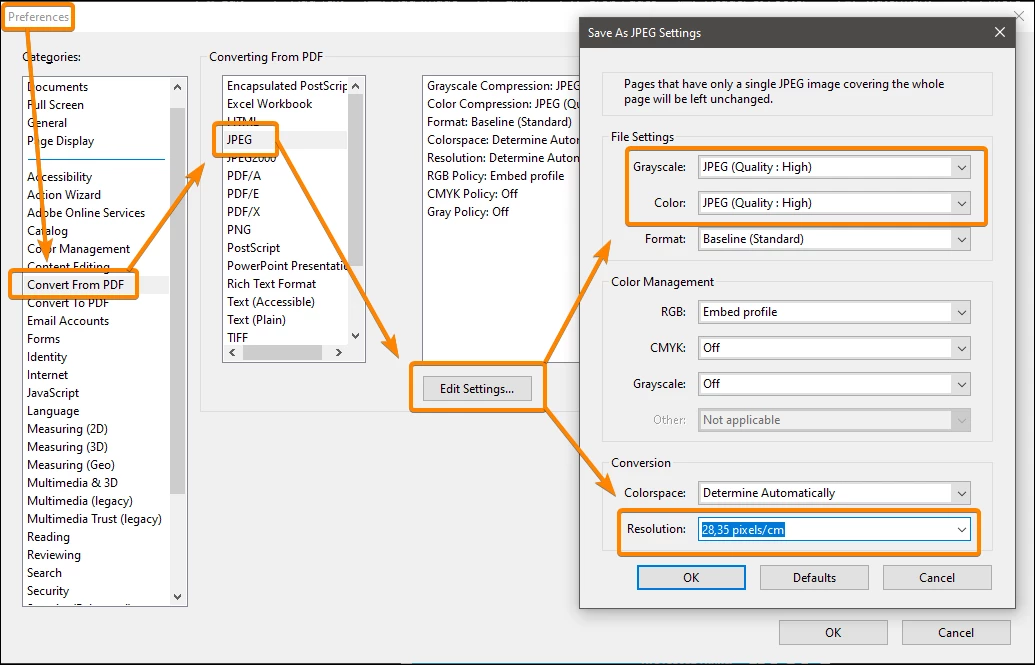
How do I output a few PDF pages at 72dpi? I have 12 pages that were created in Illustrator on 12 artboards, which are then converted to a PDF. I open the PDF in Acrobat Pro and Export ... To Image. I now have 12 jpegs at 200 dpi. I could change each one into 72dpi in Photoshop but is there an easier way by changing the resolution in Illustrator or Acrobat so that I don't have to use Photoshop?
 

This topic has been closed for replies.
Correct answer JR Boulay

Acrobat Pro : Preferences


2 replies

JR Boulay
Community Expert
JR BoulayCommunity ExpertCorrect answer
Community Expert
June 30, 2022

Acrobat Pro : Preferences


Acrobate du PDF, InDesigner et Photoshopographe
Known Participant
June 30, 2022

You are a god, thank you!

gary_sc
Community Expert
Community Expert
June 30, 2022

Hey, as long as you were in Illustrator, why not do it in Illustrator and save yourself all this flipping around. From Illustrator, Go to File (menu) -> Export Select JPG and get this:


Legend
June 30, 2022

Use Photoshop completely, not Acrobat. Open the PDF choosing a resolution.