
Answered
how do i send a PDF for Review and comment?
I have 2 PDF files that I want to send for review and comment to 6 other people and I want them to see each other's comments. How do I do that?
I have 2 PDF files that I want to send for review and comment to 6 other people and I want them to see each other's comments. How do I do that?
You need to start a shared review. To do that in Acrobat DC, type "review" into the tools search field, or go to Tools>Send for Comments, thens select to "Send for Shared Commenting":
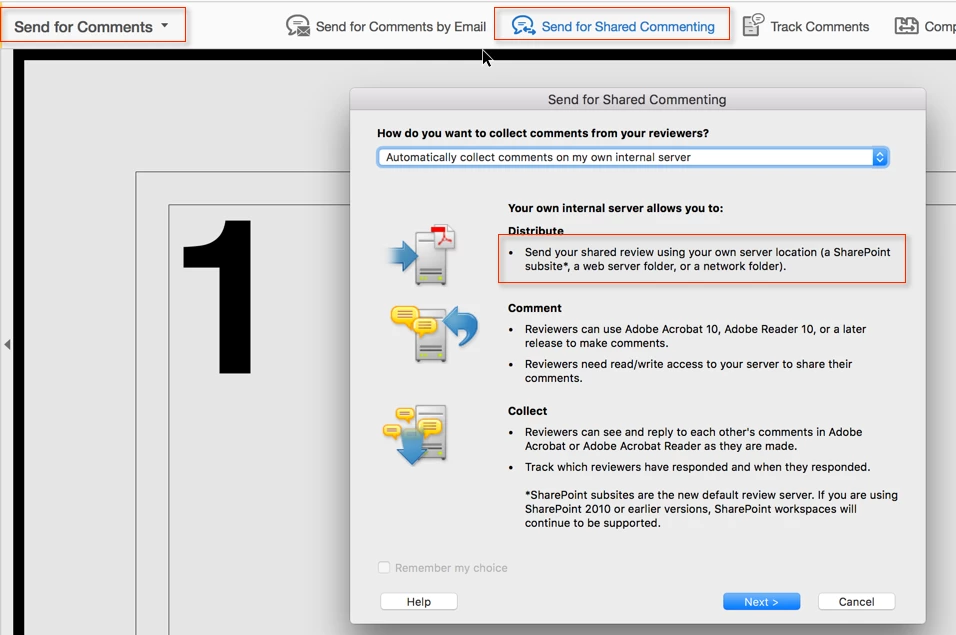
This requires that you can host the file in one of the supported ways (SharePoint, web server folder or a network folder). If you don't have a SharePoint server, or cannot setup a network folder that is accessible by all review participants, look into getting a WebDAV account (I am a happy customer of SqeakSoft)
Already have an account? Login
Enter your E-mail address. We'll send you an e-mail with instructions to reset your password.
 AdChoices