


September 18, 2024
Answered

How do I set Acrobat to default to Windows file manager

  • September 18, 2024
  • 1 reply
  • 1311 views

My PC is equipped with a file manager called Explorer, it was included in the operating system (Windows 11). I use this exclusively to manage files and folders. 


In Acrobat, when I save a file, it defaults to some Adobe file manager that's much less efficient. It only shows me 5 folders that I've recently saved other files to, whereas the Windows explorer shows me the folders on my PC and lets me choose where to save. 
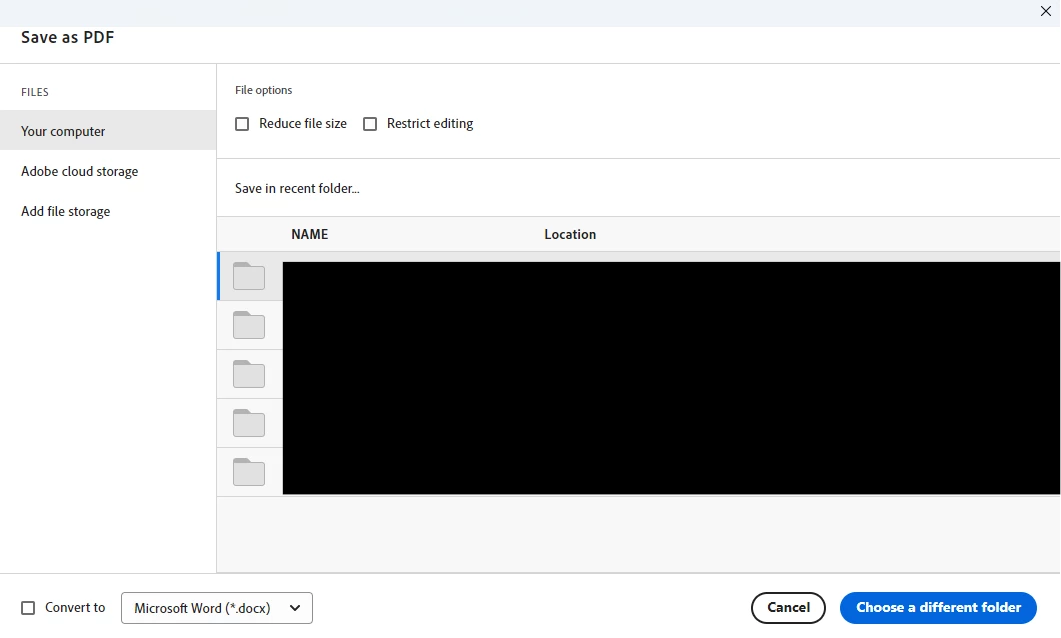
I know I can click "Choose a Different Folder" and Adobe will pull up File Explorer but I'd like to skip that step and just have the file explorer pop up when I hit save-as - just like it does with every other app. 

Correct answer Thom Parker

That's just the way it works. As far as I know there isn't a preference or setting that controls how the file saving proceeds.


When any app saves a file it displays the system file save dialog. That's what you see in "Choose a Different Folder".  Rather than going directly to file save dialog, Acrobat first provides you with the option of choosing a recently used folder. This behavior has nothing to do with any file manager. It is supposed to be a convenience. But I'm with you, I prefer to skip this step and go right to the file manager.  


1 reply

Thom Parker
Community Expert
Thom ParkerCommunity ExpertCorrect answer
Community Expert
September 18, 2024

That's just the way it works. As far as I know there isn't a preference or setting that controls how the file saving proceeds.


When any app saves a file it displays the system file save dialog. That's what you see in "Choose a Different Folder".  Rather than going directly to file save dialog, Acrobat first provides you with the option of choosing a recently used folder. This behavior has nothing to do with any file manager. It is supposed to be a convenience. But I'm with you, I prefer to skip this step and go right to the file manager.  


Thom Parker - Software Developer at PDFScriptingUse the Acrobat JavaScript Reference early and often
Participant
April 3, 2025

That is a really stupid design.  Smacks of something Apple would do, but I don't think even Apple would not allow one to set a default folder to save files.  So simple for Adobe to have done or to do in an update!

Participant
September 22, 2025

I found this and it works!


If You Want to Use the Windows Save Dialog (Acrobat)
If you find that Acrobat presents its own interface instead of the standard Windows File Explorer dialog, you can change the setting: 
 
  1. Open Adobe Acrobat.
  2. Go to Edit > Preferences (on Windows) or Adobe Acrobat > Preferences (on macOS).
  3. Select General from the Categories list.
  4. Uncheck the box next to "Show online storage when saving files".
  5. Click OK.
Now, when you use "Save As" again, it should open the familiar Windows File Explorer save dialog.