Participant
March 1, 2018
Question

How do I show highlights, but not print highlight comments?

  • March 1, 2018
  • 2 replies
  • 3774 views

Hi There,

This is a hard question for me to word, but a picture is worth a thousand words right, so please refer to the picture below.
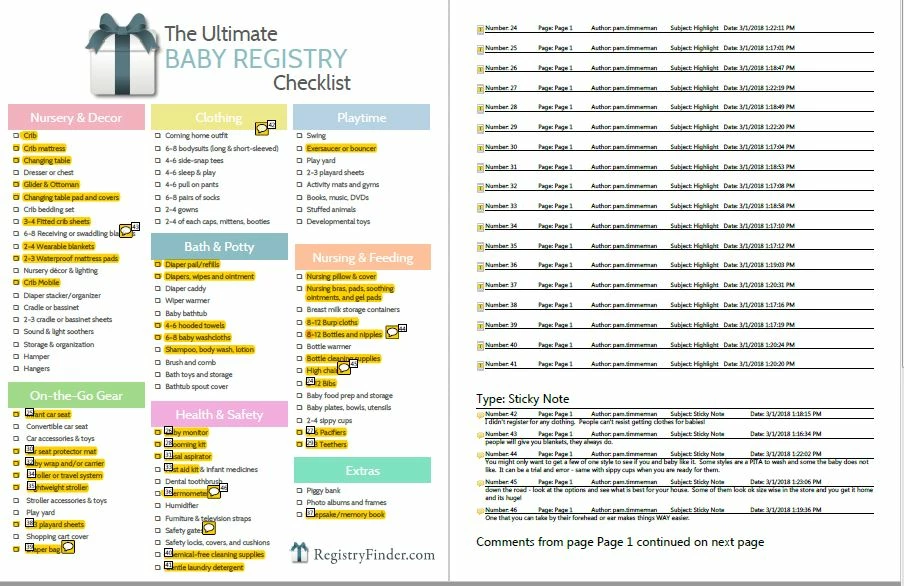
For some reason every time a highlight was created a comment was created as well. Fair enough, but 100% of my highlights don't have a corresponding comment.  The only comments I included were in sticky notes.

What I want to do is print the PDF, showing the highlights, but not showing the highlight comments (which don't really show or add anything).  I also have 5 sticky notes that I would like it to assign numbers to and include the comments on the comment summary page (pg. 2). Overall, I have 41 highlights and the summary of them in the comments section is unnecessary.  Is this even possible?

I hope that makes sense.  If not, I am happy to clarify.

Thank you in advance!

This topic has been closed for replies.

2 replies

Document Geek
Community Expert
Community Expert
March 2, 2018

First filter by type. Choose only sticky notes. Then create your comment summary and choose "Only the comments currently showing."

jackhhazeAuthor
Participant
March 2, 2018

Thank you Document Geek,

I was thinking along the same lines as you... only thing is when I filter by sticky notes, I lose all the highlights . Then if I follow the rest of your steps it prints exactly the way I want it, except without any highlights.  Thank you for taking the time to respond though. 

try67
Community Expert
Community Expert
March 1, 2018

Yes, it can be done using a script. First of all, if you want to disable adding the highlighted text as the highlights' comment, go to Edit - Preferences - Commenting and tick off the box next to "Copy selected text into Highlight...".

Now, to reset the ones you already created you can run this code from the JS-Console:

this.syncAnnotScan();

var annots = this.getAnnots();

if (annots!=null) {

    for (var i in annots) {

        var annot = annots;

        if (annot.type=="Highlight") annot.contents = "";

    }

}

To run this code copy it, then press Ctrl+J in Acrobat. Paste the code into the window that opens, select all of it using the mouse or keyboard and press Ctrl+Enter.

I think you'll be better off adding the numbers to the sticky notes by hand.

jackhhazeAuthor
Participant
March 2, 2018

Thank you try67,

I followed your instructions, but ctrl + J on my computer doesn't do anything.  If could be locked down because it's a work computer.

try67
Community Expert
Community Expert
March 2, 2018

Are you using Acrobat or the free Reader?