
Known Participant
November 30, 2021
Answered

How do I stop pdf from automatically converting text links to hyperlinks in PDF.

  • November 30, 2021
  • 4 replies
  • 6023 views

Hi, I used to know this and forget. My word doc has text links that are not linked. When converted to PDF, PDF automatically converts all them to a link.

How do I stop pdf from automatically converting text links to hyperlinks in PDF.
This topic has been closed for replies.
Correct answer JR Boulay

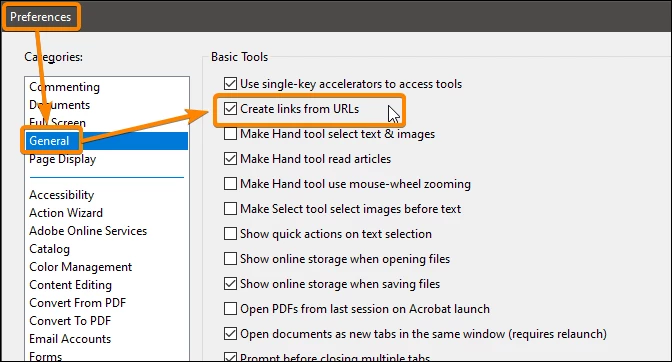
Uncheck this option:

4 replies

JR Boulay
Community Expert
Community Expert
October 5, 2023

Mac: Acrobat menu or CMD-K

Windows: Edit menu or CTRL-K

Acrobate du PDF, InDesigner et Photoshopographe
Participant
December 22, 2023

i unchecked the box and saved. restarted and it still attaches as link. I go back to preferences and the box is unchecked

Participant
October 4, 2023

Where exactly are you when you see "Preferences"  

JR Boulay
Community Expert
Community Expert
December 1, 2021

There is no "link objects" in this case.

URLs and emails are are detected automatically by the application (default setting).

Acrobate du PDF, InDesigner et Photoshopographe
JR Boulay
Community Expert
JR BoulayCommunity ExpertCorrect answer
Community Expert
November 30, 2021

Uncheck this option:

Acrobate du PDF, InDesigner et Photoshopographe
murrjamesAuthor
Known Participant
November 30, 2021

That is excellent, thanks. So if they were links and not test. Can the links be removed so when it is PDF, they are text links?