

cricket1001-2
Known Participant
December 28, 2020
Answered

How to add a star shape to comment options in Acrobat DC Pro

  • December 28, 2020
  • 3 replies
  • 10935 views

Using Acrobat DC Pro

I would like to add a star shape to the items you can insert in a pdf in the "Comments" Tool.  I don't understand why there aren't more shapes to insert in a pdf besides the following:

I think it would be great if Adobe would include the following shapes that you can add in a MS Word document like the following:
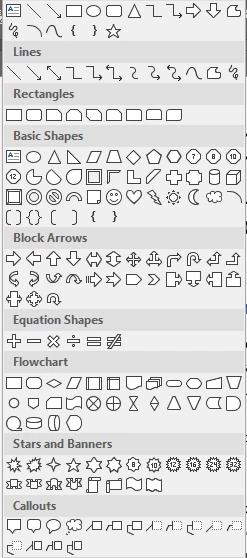
Please, if there is any way to add a group of shapes, that I would use most often, somewhere where it would be easy to insert the shape in a pdf, I would highly appreciate it.

Thanks so very much!!!!

This topic has been closed for replies.
Correct answer Cara28461986cixr

This question was asked a while ago, but for others who come upon the same query like I did, you can create your 'image' in another program (eg. Word, Publisher), getting it just how you want it to appear (including grouping if it is a composite image-I made a filled star with a circle around it).  Then copy from there & just paste it onto your PDF, after activating the "edit" menu.  You can then move and size this image at will within Acrobat, among other image options available by right-clicking once the image is selected.  Not perhaps the best way to do it, but pretty quick and easy.  A custom stamp could be created from same image; the specific instructions to create custom stamps in Acrobat are readily available elsewhere [eg, https://helpx.adobe.com/acrobat/using/adding-stamp-pdf.html]. From this same link: "to add an image to a PDF one time only, simply paste the image into the document [without activating Edit]. Pasted images have the same characteristics as other stamp comments; each includes a pop-up note and editable properties."  See my attachment for some further details about both of these ways to paste.

3 replies

Cara28461986cixrCorrect answer
Participant
June 5, 2024

This question was asked a while ago, but for others who come upon the same query like I did, you can create your 'image' in another program (eg. Word, Publisher), getting it just how you want it to appear (including grouping if it is a composite image-I made a filled star with a circle around it).  Then copy from there & just paste it onto your PDF, after activating the "edit" menu.  You can then move and size this image at will within Acrobat, among other image options available by right-clicking once the image is selected.  Not perhaps the best way to do it, but pretty quick and easy.  A custom stamp could be created from same image; the specific instructions to create custom stamps in Acrobat are readily available elsewhere [eg, https://helpx.adobe.com/acrobat/using/adding-stamp-pdf.html]. From this same link: "to add an image to a PDF one time only, simply paste the image into the document [without activating Edit]. Pasted images have the same characteristics as other stamp comments; each includes a pop-up note and editable properties."  See my attachment for some further details about both of these ways to paste.

try67
Community Expert
Community Expert
December 28, 2020

You can use stamps for all the other shapes you wish to have.

cricket1001-2
Known Participant
February 1, 2021

What do you mean?  Would I be able to move and resize the shapes from stamps?  What kind of shapes are you referring to be able to do as a stamp?

AkanchhaS8194121
Legend
December 28, 2020

Hey!


If I understand your requirement correctly, then you are willing to add a star icon using "Comment tool". If yes, then it is actually possible to do.

Open PDF>Tools>Comment>Add Sticky note>right click on sticky note>Properties>Appearance>select Star>OK here you can also check the dialog box to "Make Properties Default".


Thanks,

Akanchha 


cricket1001-2
Known Participant
December 28, 2020

Thanks.  That can be used sometimes.  But you can't change the size of the shape, star.  I would like to be able to have the different shapes, like a star, in the comment object list of what you can insert as a shape.  For example: 

1) If I use the circle shape, or square, or arrow, I can change the size and can manipulate it more than as you suggested.

Thanks,

Pat


AkanchhaS8194121
Legend
December 28, 2020

That's correct. For shapes, you can adjust the size, but for comments icon you can't. 

It would be a great suggestion, so we'd like you to fillout this feature request form to share your thoughts: https://www.adobe.com/products/wishform.html 


Thanks,

Akanchha