
c.pfaffenbichler
Community Expert
Community Expert
August 20, 2020
Question

how to always have certain tools expanded when opening pdf

  • August 20, 2020
  • 1 reply
  • 650 views

AcrobatPro DC (2020.009.20074) on MacOS 10.15.4


I have a custom Tools set – is there a way to always have it displayed on opening any pdf right away without having to click it? 
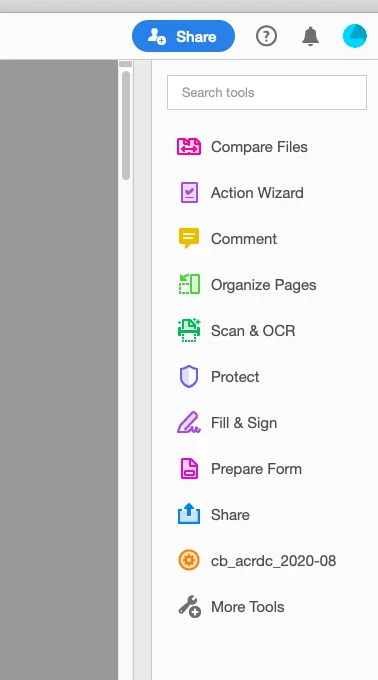
 

Somehow I expect this is an exceedingly basic setting but I couldn’t figure it out, so thanks for any feedback. 

This topic has been closed for replies.

1 reply

AkanchhaS8194121
Legend
August 20, 2020

Hey!


Thanks for highlighting this.

The right-hand Toolpane is active by default. So, if you close it, it will be closed for next time. To keep this Toolpane active, currently we do not have any inbuilt preferences within Acrobat DC. However, there's a workaround that helps you to get the Toolpane open, everytime you open the document.


Open a PDF>Open Toolpane>Navigate to Acrobat (Mac)>Preferences (Ctrl+k)>Documents> check "Restore last view settings when reopening documents">OK> Close Acrobat and reopen it.


Thanks,

Akanchha

c.pfaffenbichler
Community Expert
Community Expert
August 20, 2020

Thank you. 


I am afraid I was unclear: 

I do not just want the Toolpane visible, I want my custom Tools to be expanded (see screenshot) on opening a pdf. 

The »Restore last view settings when reopening documents«-Preferences-setting does not seem to honor that aspect. 

Document Geek
Community Expert
Community Expert
August 20, 2020

Nope, sorry. That functionality does not exist in Acrobat.