
Syl20rkoko
Participating Frequently
October 25, 2023
Answered

How to always show (pin) the page thumbnails in Acrobat 2023

  • October 25, 2023
  • 1 reply
  • 2323 views

For every PDF I open, I have to see the page thumbnails but since the new Acrobat, version 2023, this does not seem to be available anymore, be it on the thumbnails panel or the preferences. 
I know that if I press F4, the panel will open, but since I need it for all my documents, it is very couterproductive. 
I have tried both in the enabled and desabled "New Acrobat" and I cannot find that option anywhere.
Has someone been able to enable this?
If not, will Adobe please bring back the option to "pin" panels?
Correct answer Amal.

Hi there


Hope you are doing well and thanks for reaching out.


Please try the steps below and see if that works:

  1. Open the PDF
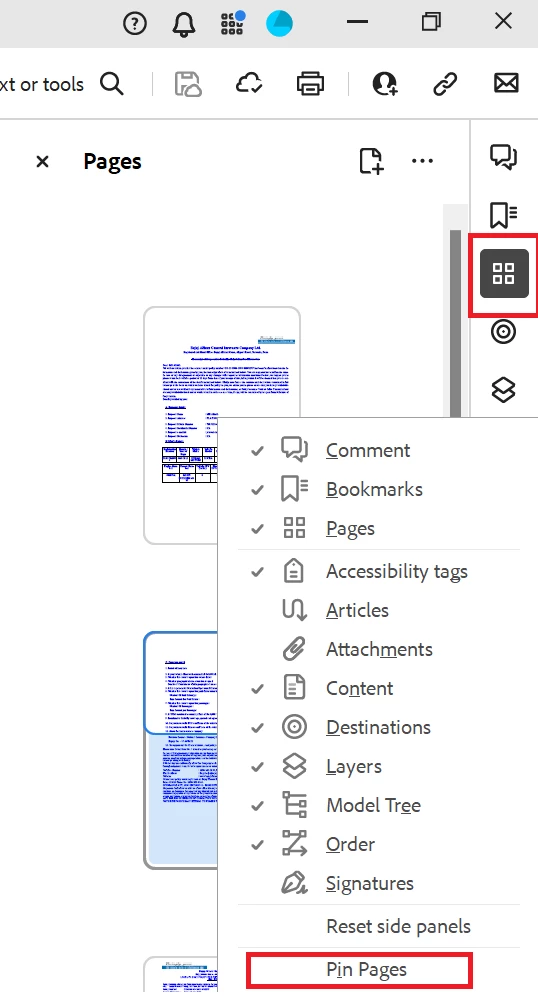
  2. Select the Pages option from the right hand pane to enable the thimbnail
  3. right click on the right hand tool pane and select 'Pin pages' to make it the default selection


Let us know how it goes.


~Amal


1 reply

Amal.
Community Manager
Amal.Community ManagerCorrect answer
Community Manager
October 25, 2023

Hi there


Hope you are doing well and thanks for reaching out.


Please try the steps below and see if that works:

  1. Open the PDF
  2. Select the Pages option from the right hand pane to enable the thimbnail
  3. right click on the right hand tool pane and select 'Pin pages' to make it the default selection


Let us know how it goes.


~Amal


Syl20rkoko
Participating Frequently
October 27, 2023

That worked. Thank you very much. 
Now, because there is now way to add the "Take a Snapshot" button anywhere, I reverted to the old skin and the pinned pages is still working. It did not stick when enabled through the old skin son I had to uninstall and reinstall but now it all works.