Pierre_6.1Correct answer
Inspiring
January 6, 2025

I'm sorry to bother you but I still have the same problem.

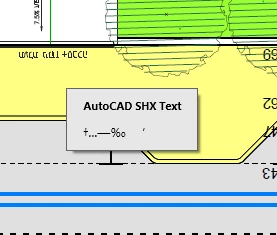
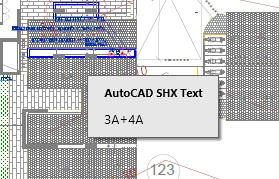
altho I checked that option "hide comments popup" I can still see these popups when moving mouse over:


would you help me again please? it's really annoying and make the app work really slow. I'm desperate.


Hello, I know that this discussion had been around for a while, but I happen to know a possible solution to this issue.  Before converting your AutoCAD dwg file into a pdf, make sure that the AutoCAD system variable PDFSHX is set to 0.  This ensures that the sidebar with the comments does not show up as well.  Simply type "PDFSHX" at the command line to access this setting.

Pierre

7 replies

Participant
January 17, 2023

Problem solved

Thank you!

Translate
AkanchhaS8194121
Legend
January 17, 2023

Great!

Thanks for confirming that. Let us know if further assistance is required from our end.


~Akanchha

Translate
Participant
January 22, 2023

I'm sorry to bother you but I still have the same problem.

altho I checked that option "hide comments popup" I can still see these popups when moving mouse over:


would you help me again please? it's really annoying and make the app work really slow. I'm desperate.


Translate
AkanchhaS8194121
Legend
January 16, 2023

Hi @Eran27959918gzn8 


++adding on to what the expert has suggested.

In the screenshot shared above, this pop-up looks like a comment note. If it's a PDF file with annotations and opened within Acrobat/Reader desktop application. Here's where you can change the pop-up commenting behavior: 

Open Acrobat or Reader>Edit (Ctrl+K)> Commenting>Pop-up behavior 


Have you noticed this with other PDF files, or is it only with the Auto-CAD 3d files? 


Let us know if these changes will help.


Thanks,

Akanchha

Translate
Thom Parker
Community Expert
Community Expert
January 16, 2023

If this is a PDF, and it is being viewed in Acrobat, then you can change the popup behavior in the Preferences. Select the "Commenting" category and you'll see a few options under the "Popup open behavior" heading. 


Translate
Thom Parker - Software Developer at PDFScriptingUse the Acrobat JavaScript Reference early and often