steve_h7
Participant
December 6, 2016
Question

How to change background to transparent and leave text and image intact and editable?

  • December 6, 2016
  • 1 reply
  • 752 views

Hi all,

I need to change this yellowish background to a transparent one so it can be printed on a preprinted form with a border and so only the text

and opaque image are printed but can be modified for each individual winner certificate. Is there a way I can do this?

This is the document I'm trying to edit:
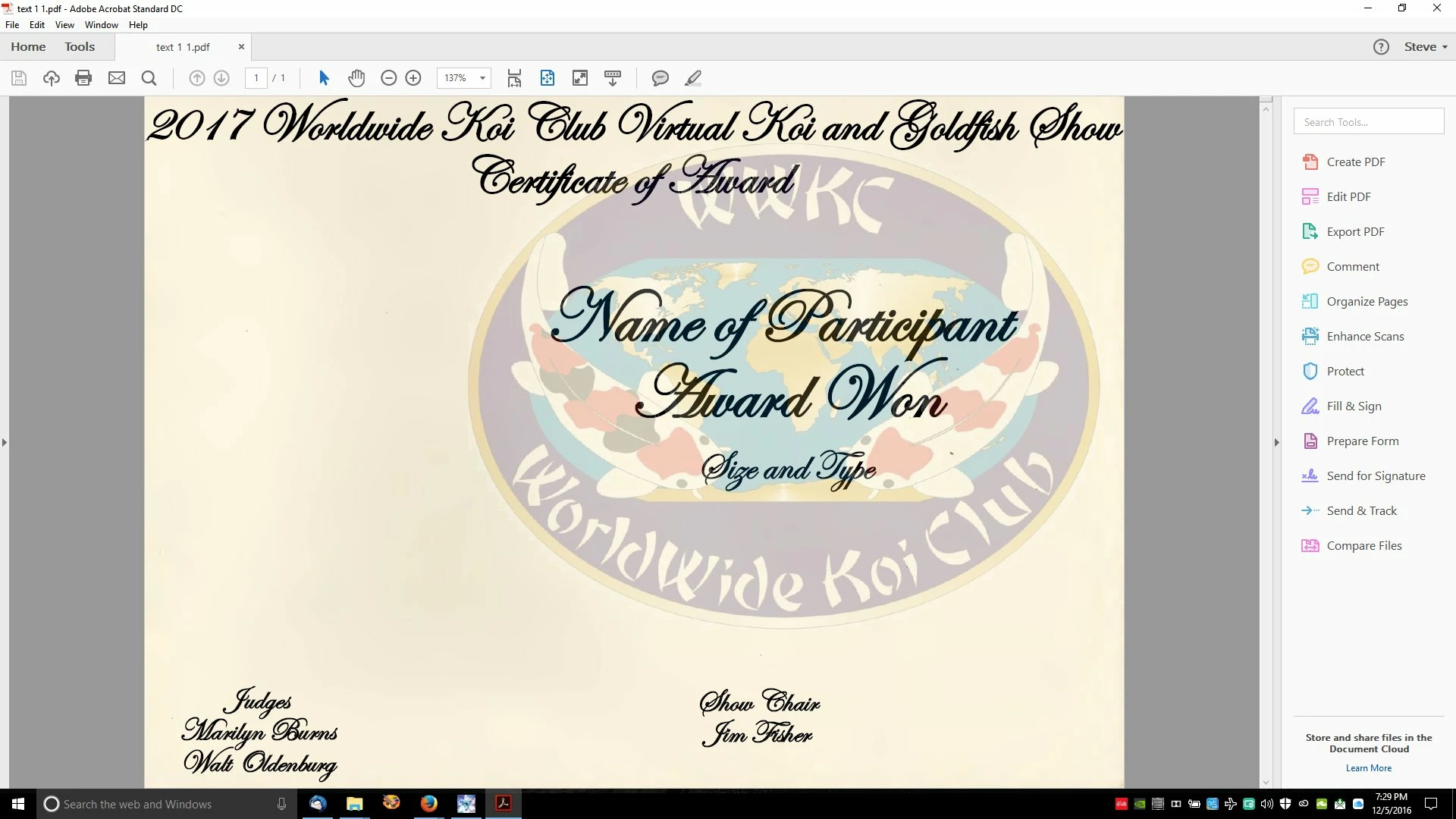
Thanks in advance for any help!

Steve

This topic has been closed for replies.

1 reply

Legend
December 6, 2016

If thebackground is a simple yellow rectangle maybe it could be deleted in Acrobat Pro - bit of a long shot though. Not something you can do in Acrobat, or really practically do with a PDF. This is a case for going back to the original design in the original app.

(Note: from the point of view of printing, white is just as good as transparent, you shouldn't have to care which).

steve_h7
steve_h7Author
Participant
December 6, 2016

Thanks for the help!

I think you're right and I should have gotten Pro but only got the basic DC version, so was unable to go that route, but I was

able to go back and create a transparent background in Photoshop and save it as a PDF and created all the text and graphic

over again and it worked!

Thanks again,

Steve