May 3, 2019 3:08 PM UTC
Answered

How to change default message when sending a file for signature?

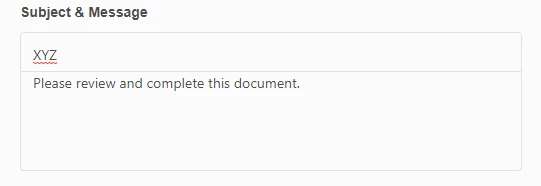
How do I change the default message when I'm sending a file for a signature? By default it says " Please review and complete this document".

I want to customize that message to my own words so I can stop having to type it every time.

AkanchhaS8194121
AkanchhaS8194121Correct answer
Legend
May 17, 2019 4:43 AM UTC

Hi there,

We apologize for the delay in response to your query.

If you are referring to the default message which reflects when you send a document for signature (as shown in the screenshot below), then sorry to say, that is not possible to change the message by default. You have to enter it manually while sharing file for signature.

Note: The message template feature is available in business level account. Individual accounts doesn't have this feature available.

Hope this answers your query.

Thanks,

Akanchha

9 replies

Participant
Apr 3, 2024 2:38 PM UTC

At least it says "Please" in English. The default text in Spanish is "Revisa y firma el acuerdo", it could not be more rude.

Translate
Participant
Sep 19, 2023 9:07 PM UTC

agree!   the sentence itself is flawed...review and COMPLETE?   I have to type in review and "SIGN"  every time.  this needs to be a template I can revise once


Translate
Participant
Nov 2, 2023 2:50 AM UTC

C'mon Adobe, how many people need to ask before you update this, it's enough to want to change to a new product. Now I notice you state 'Agreement' I preferred 'Document' at least that was correct if not ideal, but Agreement - I have to retype every single time and it's too time consuming in my line of work as I send out numerous each day


Translate
AkanchhaS8194121
AkanchhaS8194121Correct answer
Legend
May 17, 2019 4:43 AM UTC

Hi there,

We apologize for the delay in response to your query.

If you are referring to the default message which reflects when you send a document for signature (as shown in the screenshot below), then sorry to say, that is not possible to change the message by default. You have to enter it manually while sharing file for signature.

Note: The message template feature is available in business level account. Individual accounts doesn't have this feature available.

Hope this answers your query.

Thanks,

Akanchha

Translate
Participant
Dec 6, 2022 12:23 AM UTC

Hello - This was asked in 2019. Has Adobe not come up with a way to add a template here? I also hate having to type this time after time. Has anyone else figured out how to solve this issue? Thanks in advance!

Translate