


Inspiring
January 29, 2016
Answered

How to change default print settings

  • January 29, 2016
  • 2 replies
  • 112245 views

When printing a document to PDF, the colors were way too dark.

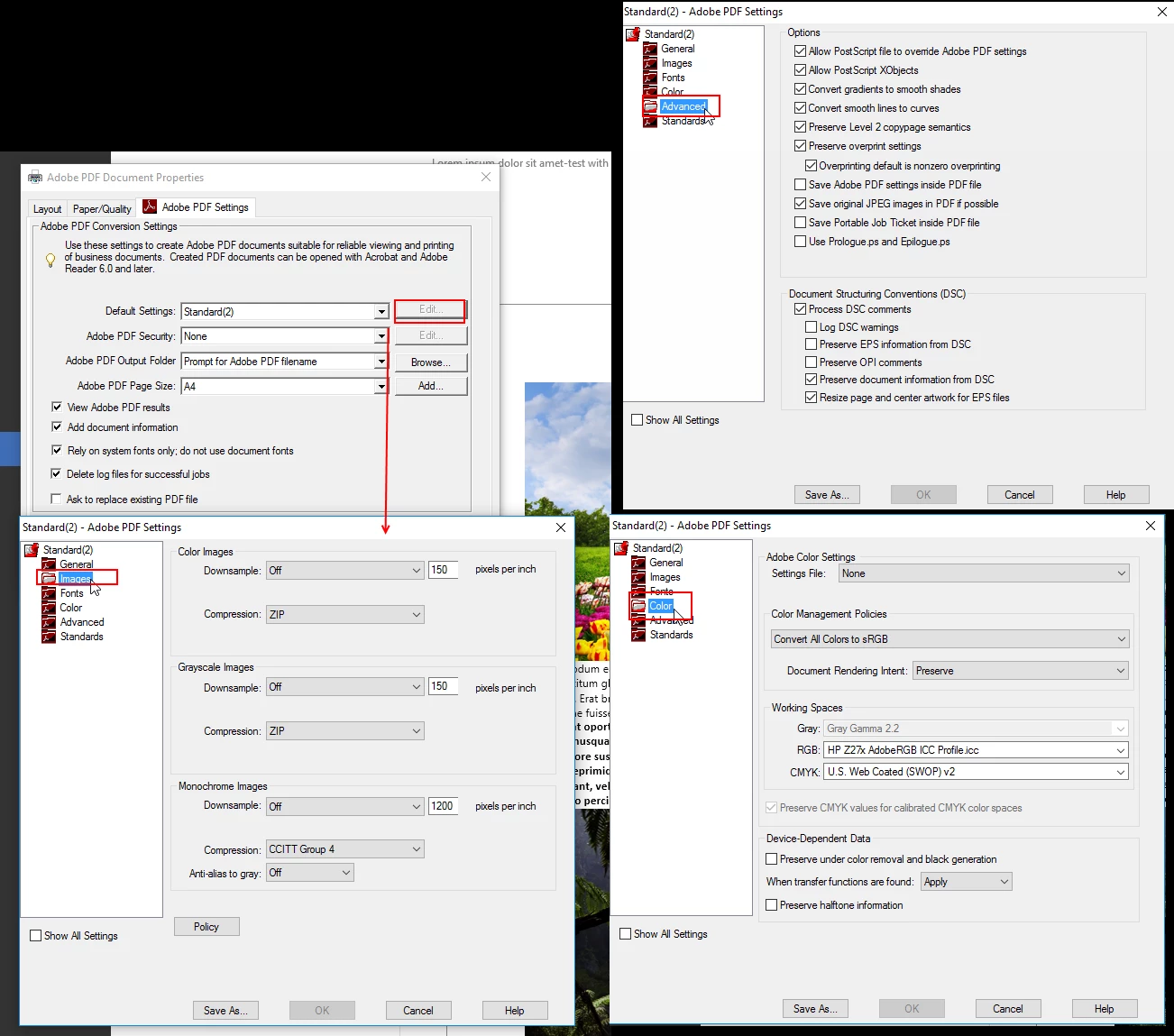
After a lot of trying I have created  new settings and saved that as a new printer-setting or profile (or how it is named).

Now the colors are very close to the original.

I'd like to that that (new) setting as my default  - but keep the old one.

How to set the new profile as default. Each time Acrobat resorts the old and I have to manually select the new one.

Thanks

=
Correct answer Test Screen Name

Rightclick on what?

Adobe PDF has 'Standard'

my own settings

C:\Users\userrnamel\AppData\Roaming\Adobe\Adobe PDF\Settings

file: standard(2).joboptions

It is not possible for me to change the 'Standard' and override it, i.e. I need to save it to a new file, like standard(2) in this case.

however, by default, when printing, Adobe selects standard instead of MY 'standard'

when accidentally print without first selecting my own settings, the result is a wrongly colored output and I need to print again.

Guess there is no solution of this.

=


‌The solution is to change printing preferences. Right click on the Adobe PDF printer in the Printers Control Panel. This is how you change any printing default for any printer.

2 replies

Community Manager
February 1, 2016

Hi,

If there are permissions issues with the user profile only then such issues persist. Would like to know whether is this Office Computer ?

If yes, please contact to your IT so that they will help you in with local administrative rights .

Regards,

Yatharth

Community Manager
January 29, 2016

Hi adwul62,

Would like to inform you that if its not putting the new setting as default ,seems that issues are with administrative rights.

Regards,

Yatharth

adwul62Author
Inspiring
January 30, 2016

Sorry,

I am afraid I don't understand.

Am just a simple 'end-user'. 

How to solve this?

Thanks

=

Legend
February 1, 2016

‌Default settings for printers need to be done from the Printers Control Panel