

Rolzay
Known Participant
April 27, 2018
Question

How to change the default font for drop down lists (PDF interactive form)?

  • April 27, 2018
  • 3 replies
  • 4524 views

Hello,

this is a really annoying problem I'm facing, so hopefully someone can help me.

I've designed a from in InDesign, which includes a few drop down lists. Once I export it and edit the form in Adobe Acrobat Pro, the font under the appearance tab is set to some weird format, which you can see in the pic below.
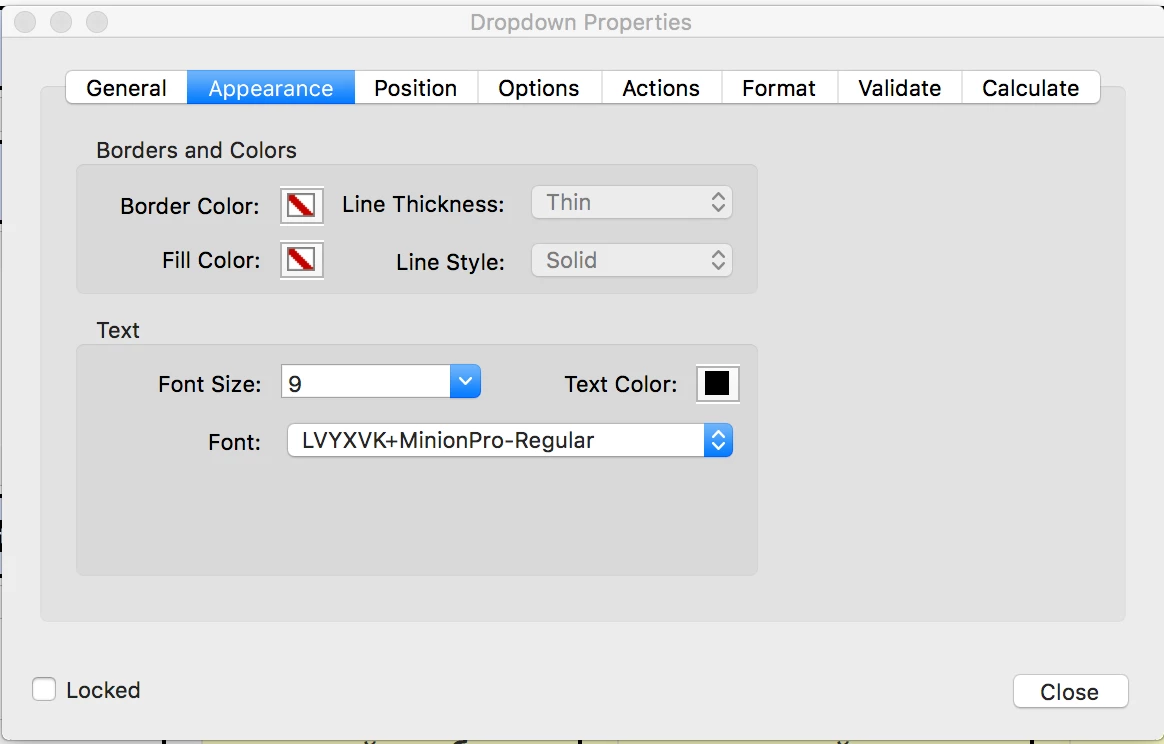
This isn't too much of a problem for myself, but once I send the form to my client, they say that the drop down list items are displayed as gibberish rectangle boxes which can't be read. This is a pain in the ass, because I need to edit the PDF form each time I export it for other reasons, so that means I need to change the font again for each and every drop down list every time. I'm just wondering if there is a way to change the font to Times New Roman or something so it stays like that forever? This actually might be an InDesign issue too.

Thanks

This topic has been closed for replies.

3 replies

JR Boulay
Community Expert
Community Expert
April 30, 2018

You can run this script in the JavaScript Console to batch change the font of all comboboxes inside a document:

for (var i = 0; i < numFields; i++) {

    var fName = getNthFieldName(i);

    var f = getField(fName);

    if ((f != null) && (f.type == "combobox")) {

        f.textFont = font.Times;

    }

}

Acrobate du PDF, InDesigner et Photoshopographe
Rolzay
RolzayAuthor
Known Participant
April 30, 2018

Thank you, will try that out.

Bevi Chagnon - PubCom.com
Legend
April 27, 2018

I was able to replicate the problem and yes, I believe it's a bug.

Times Roman should be applied to it as with other form fields.

Until it's corrected, adjust the properties of each box to use Times Roman (not Times New Roman). Times Roman is listed in the top section of the Properties / Appearance / Font which are the default fonts for PDFs. Don't use the use the fonts lower down in the list as they probably won't be embedded and might have missing characters to your form's users.

Question: would you double check that this happens on Combo Boxes? For me, Combos were fine but List Boxes had the crazy font.

To clarify: Combo Boxes use a drop down list.

List Boxes use a scrolling list with up/down arrows on the right.

I'll log this as a bug with Adobe. Thanks Rolzay​ for spotting this.

|&nbsp;&nbsp;&nbsp;&nbsp;Bevi Chagnon &nbsp;&nbsp;|&nbsp;&nbsp;Designer, Trainer, &amp; Technologist for Accessible Documents ||&nbsp;&nbsp;&nbsp;&nbsp;PubCom |&nbsp;&nbsp;&nbsp;&nbsp;Classes &amp; Books for Accessible InDesign, PDFs &amp; MS Office |
Rolzay
RolzayAuthor
Known Participant
April 27, 2018

Yeah, I'm getting the crazy font in List Boxes too.

I suppose I'll have to live with it until they fix the bug (if ever).

Thanks for your help.

Bevi Chagnon - PubCom.com
Legend
April 27, 2018

Can you reply with a bit more details?

Which version of InDesign are you using?

InDesign calls drop-down lists "combo lists." Is that what you're creating?

Does this happen only to drop-down lists, but to other form elements too?

|&nbsp;&nbsp;&nbsp;&nbsp;Bevi Chagnon &nbsp;&nbsp;|&nbsp;&nbsp;Designer, Trainer, &amp; Technologist for Accessible Documents ||&nbsp;&nbsp;&nbsp;&nbsp;PubCom |&nbsp;&nbsp;&nbsp;&nbsp;Classes &amp; Books for Accessible InDesign, PDFs &amp; MS Office |
Rolzay
RolzayAuthor
Known Participant
April 27, 2018

I'm using the very latest version of InDesign.

InDesign calls them Combo Boxes yeah.

It only happens with drop down lists, other elements, such as text fields default to Times New Roman, just checked there.