


Answered
How to change the order of pop-up control entries in a custom dialog?
Hi,
I have integrated a pop-up control into a custom dialog. The entries that can be selected in the pop-up control are always listed in alphabetical order. How can I ensure that the preselected option always appears as the top/first entry in the pop-up control and that the other options always appear below the preselected entry?
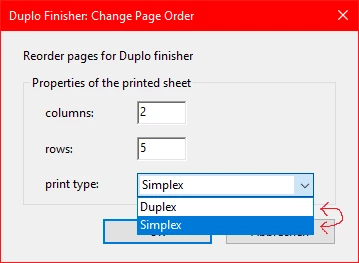
    var layoutDialog = {
        cols: "2",
        rows: "5",
        druck: null,
        format: null,
        order: null,
        direction: null,

        initialize: function (dialog) {
            dialog.load({
                "col1": this.cols,
                "row1": this.rows,
                "druk": {
                    "Simplex": +1,
                    "Duplex": -2
                },
             });
        },
        DoDialog: function () {
            return app.execDialog(this);
        },
        description: {
            name: "Duplo Finisher: Change Page Order",
            elements: [{
                    type: "view",
                    align_children: "align_left",
                    elements: [{
                            type: "static_text",
                            name: "Reorder pages for Duplo finisher"
                        }, {
                            type: "cluster",
                            name: "Properties of the printed sheet",
                            elements: [{
                                    type: "view",
                                    align_children: "align_row",
                                    elements: [{
                                            type: "static_text",
                                            name: "columns:",
                                            char_width: 8
                                        }, {
                                            type: "edit_text",
                                            item_id: "col1",
                                            char_width: 5
                                        }
                                    ]
                                }, {
                                    type: "view",
                                    align_children: "align_row",
                                    elements: [{
                                            type: "static_text",
                                            name: "rows:",
                                            char_width: 8
                                        }, {
                                            type: "edit_text",
                                            item_id: "row1",
                                            char_width: 5
                                        }
                                    ]
                                }, {
                                    type: "view",
                                    align_children: "align_row",
                                    elements: [{
                                            type: "static_text",
                                            name: "print type:",
                                            char_width: 8
                                        }, {
                                            type: "popup",
                                            item_id: "druk",
											width: 140,
											height: 22
                                        }
                                    ]
                                }
                            ]
                        }, {
                            alignment: "align_right",
                            type: "ok_cancel"
                        }                    ]
                }
            ]
        }
    };

	if (layoutDialog.DoDialog() === "ok") {

}
 AdChoices