
Inspiring
July 15, 2024
Answered

How to completely uninstall CS6 Web and Design, can't delete all folders

  • July 15, 2024
  • 2 replies
  • 2875 views

Hi all, I need help.

I try to read the post in this forum and follow the instruction to remove CS 6, using "AdobeCreativeCloudCleanerTool.exe". 

After I restart the computer, I found the icon of the app and folder is still there in my window programe bar and taskbar. So I contact Adobe support. He requested to remote control my computer but as security reason I refused. He taught me delete some folders and still there are folders in Acrobat and pdf related files failed to delete no matter how I try...


C:\Program Files (x86)\Adobe\Acrobat 10.0

C:\Program Files (x86)\Common Files\Adobe\Acrobat\ActiveX

C:\ProgramData\Adobe\Adobe PDF\Distiller


These 3 folders have some files I can't delete no matter how I try...sometimes it said it requires "system" permission, sometimes it said it requires "adminstrator" permission (but I'm the admin, some other files request admin permission and I can delete them)


I restarted the computer, now this screenshot comes out "twice" everytime I restart my computer:
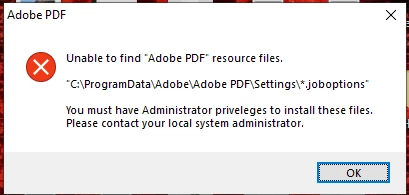
I remember I delete that folder already when the customer support told me to delete all files in C:\ProgramData\Adobe\  


I really want to delete all adobe CS 6 before I install the new subscription. How to do it if I can't let the customer support remote control my computer? And how to fix this pop up?


Thanks


    This topic has been closed for replies.
    Correct answer ChristinaWoo

    I contact the Acrobat support and finally get the solution, type it here as a record for helping others:

    1. download: 

    https://www.adobe.com/devnet-docs/acrobatetk/tools/Labs/AcroCleaner10x-11.x.zip

    https://swupmf.adobe.com/webfeed/CleanerTool/win/AdobeCreativeCloudCleanerTool.exe

    2. 

    Now please delete all Adobe folders from the below locations. Also please close all Adobe programs running in the background from Task Manager.

    • C Drive > Program Files > Adobe
    • C Drive > Program Files > Common Files > Adobe
    • C Drive > Program Files X86 > Adobe
    • C Drive > Program Files X86 > Common Files > Adobe
    • C Drive > then click on View (you will find view at the top right corner of the window) > Show hidden files > Program Data > Adobe

    It works on my computer.

    2 replies

    kglad
    Community Expert
    Community Expert
    July 15, 2024

    you should he have properly uninstall acrobat/reader and then use the acrobat cleaner, https://www.adobe.com/devnet-docs/acrobatetk/tools/Labs/cleaner.html

    Inspiring
    July 15, 2024

    I just found out in my program bar it has a product called "Adobe LiveCycle ES2", but I didn't see it in my apps and programe, is it the reason why I can't delete all the adobe files? I click on it and it is still able to open.

    John T Smith
    Community Expert
    Community Expert
    July 15, 2024

    You need to ask program questions in the forum for the program you are using
    To ask in the forum for your program please start at https://community.adobe.com/
    Moving from Using the Community (which is about the forums) to the Install forum


    https://helpx.adobe.com/creative-cloud/kb/cc-cleaner-tool-installation-problems.html to remove programs

    Inspiring
    July 15, 2024

    Sorry so it is not a Acrobat related problem? I am still learning, how to move this post to the place you said it should be?

    kglad
    Community Expert
    Community Expert
    July 15, 2024

    @ChristinaWoo 


    you posted in the "using the community" forum which deals with forum issues.