このトピックへの返信は締め切られました。
解決に役立った回答 Adorobat

Hi Alexr,

As per the issue description mentioned above, you want to know how to create/import a .cer file, is that correct?

Please refer to the steps given in the following link on how to Import and export a certificate:

Manage trusted identities, Adobe Acrobat 

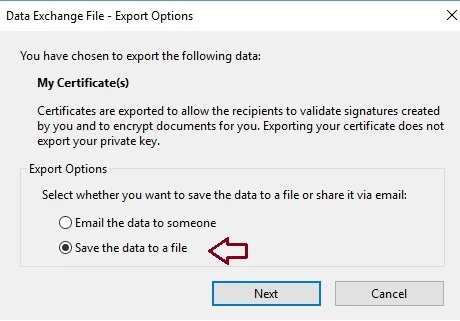
Select Save the data to a file while exporting and select .cer file from save as type drop-down.
Let us know if you have a further query.

Shivam

返信数 2

alexr99936476作成者
Participant
September 5, 2018

Hello,

Could this continue to be reviewed? When using Windows 7, I was able to execute a signature from a .CER file. Windows 10 will not allow this, please provide a work around for using an E-Signature that does not require a password and does not require you to select which signature you are planning to use. This is how Windows 7 was functioning.

Thank you,

Adorobat
Community Manager
AdorobatCommunity Manager解決!
Community Manager
August 30, 2018

Hi Alexr,

As per the issue description mentioned above, you want to know how to create/import a .cer file, is that correct?

Please refer to the steps given in the following link on how to Import and export a certificate:

Manage trusted identities, Adobe Acrobat 

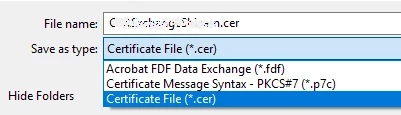
Select Save the data to a file while exporting and select .cer file from save as type drop-down.
Let us know if you have a further query.

Shivam

alexr99936476作成者
Participant
August 30, 2018

Hello,

Thank you for your reply. I have tried this method and it will not allow me to import the .cer file. I am only given the option of .p12 or .pfx

Please let me know what i need to do to proceed.

Thank you,

Legend
August 31, 2018

I may be quite wrong on this, but in my experience a CER file is the certificate for a web server, to prove it belongs to the company. It isn't (so far as I know) something to sign a document with.
