
tirah57061466
Participating Frequently
April 29, 2019
Answered

HOW TO CREATE A PDF FORM WITH SEPERATE BOXES FOR INDIVIDUAL LETTERS

  • April 29, 2019
  • 2 replies
  • 9954 views

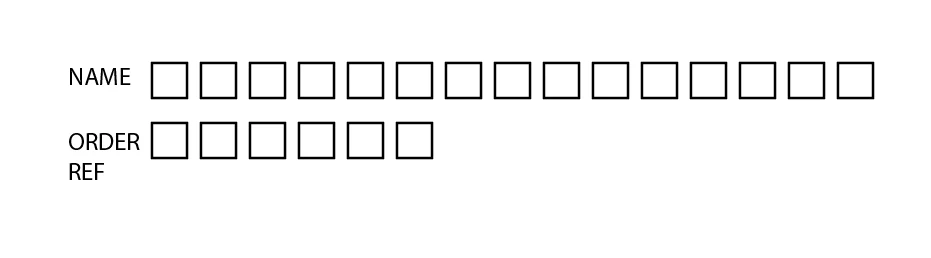
Hi, I have a form that I want people to fill in, I have enclosed an example , this is not the end result, I need to be able to calculate the number of letters which is why I need the individual boxes?

So they just type their name as normal rathert han clicking into each individual box with a letter? so you automatically move to the next box once one letter ha filled it?

Any ideas out there

Thanks
This topic has been closed for replies.
Correct answer try67

HI, I have got the code to calculate the characters, how do I change this so that it doesn't count the spaces?,I just need text and numbers?

event.value = this.getField("NAME TEXT").valueAsString.length;


Use this:

event.value = this.getField("NAME TEXT").valueAsString.replace(/\s/g, "").length;

2 replies

TᴀW
Legend
April 29, 2019

Create a single text field in Acrobat, and make it a "comb" field.

To make it a comb field, go into the properties of the text field you've created, and under the Options tab, right at the bottom, you'll find a checkbox that says "Comb of", and you can enter how many characters you want the comb to have.

id-extras.com | InDesign tools & scripts for typesetters, form designers, and translators
tirah57061466
Participating Frequently
April 29, 2019

Will this calculate how many letters as I need to prices per letter?

so at the end of the namer it will have a box that says say 15 (for the 15 letters used)?, uderneath there will be a cost for the 15 letters?

Bernd Alheit
Community Expert
Community Expert
April 29, 2019

For name use a text field with 15 characters, for order ref a text field with 6 characters.

Bernd Alheit
Community Expert
Community Expert
April 29, 2019

In the options of the text field use the entry "Comb of n characters".