Known Participant
October 28, 2020
Question

How to delete images based on resolution?

  • October 28, 2020
  • 2 replies
  • 444 views

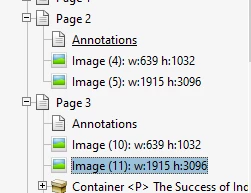
Scanned documents from the Internet Archive consist of beautiful black and white scans layered over hideous color images that make the files unpleasant to read. The Content panel of Acrobat shows these are actually seperate images of different resolution. Is there a way (with the Preflight tool presumably) to automatically remove images over or under a particular height or width? For example, in the case below, can Acrobat discard all the images that are 639x1032 and keep the ones that are 1915x3096 or vice versa?
 

This topic has been closed for replies.

2 replies

JR Boulay
Community Expert
Community Expert
October 28, 2020

try67's message in pictures:


Acrobate du PDF, InDesigner et Photoshopographe
try67
Community Expert
Community Expert
October 28, 2020

I'm not sure about that, but there is a Preflight profile that puts B&W images on one layer and color images on another.

If that works to separate them, and the layer names are always the same, then you can then use a simple script to hide the layer with the color images, and get a similar result... I haven't tried it, but I think it should work. If you could share a sample file I could give it a go myself and let you know how to do it, if it works.