
How to differentiate between a zero and a blank field in JavaScript
I have a running total (TC) that I do not want to calculate (remain blank) until both parts of the calculation have been completed. To do this I have this custom calculation:
var a = Number(this.getField("TC.1").valueAsString);
var b = Number(this.getField("Ch.2").valueAsString);
if (b!="") {
event.value = a + b;
} else event.value = "";
This worked perfectly, until I have a zero value for var b. The zero is treated as a blank field ("") and the total does not calculate.
Note: CHG column = Ch. fields and TCHG=TC. fields in the tables below
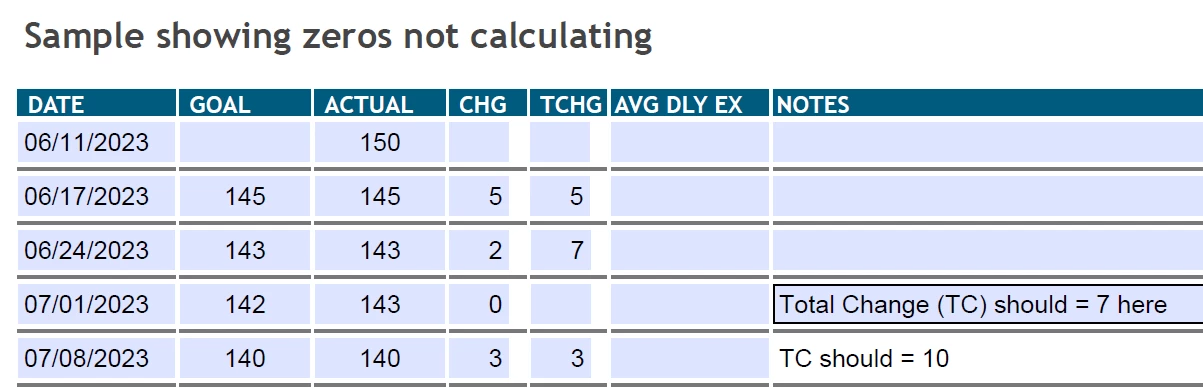
To try and rectify this, I changed the script to:
var a = Number(this.getField("TC.1").valueAsString);
var b = Number(this.getField("Ch.2").valueAsString);
if (b!="" || b==0) {
event.value = a + b;
} else event.value = "";
The above solved the calculation problem, but still equates a zero with a blank, so that the TC fields are calculated before var b has a value.
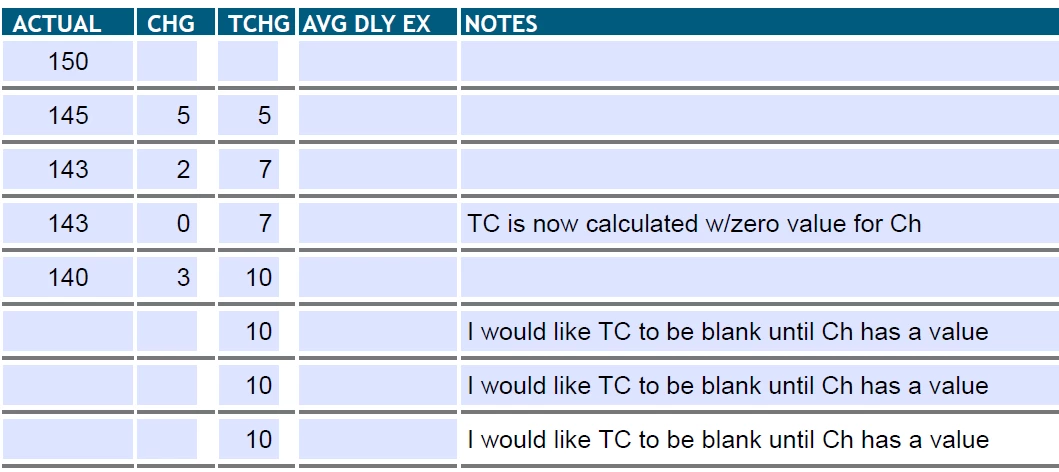
Is there any way to rewrite the script so that a zero is considered a number to be calculated AND a blank fe field is not? Any help would be appreciated!
 AdChoices