
JudicioAvocats
Participant
November 8, 2017
Answered

How to do a PDF/A directly with my scan ?

  • November 8, 2017
  • 1 reply
  • 1432 views

Hi,

I have a document to transfert to an organisme. But this organisme accept juste the PDF/A and not with the modifications. So I don't to do scan and also change the document in PDF/A. So how I do for scan directly my document in PDF/A format ?
This topic has been closed for replies.
Correct answer Adorobat

Hi MathCompagnat,

Sorry for the delay in response.

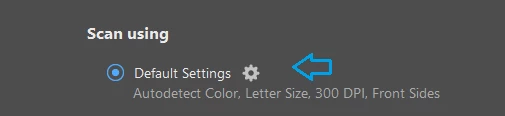
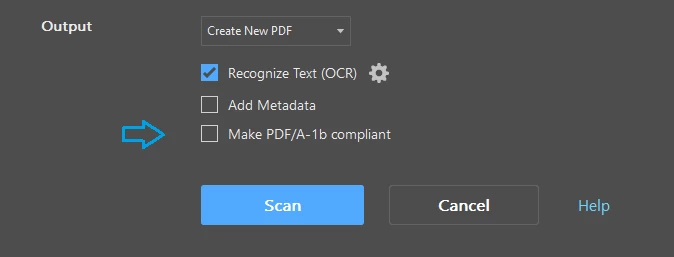
To create PDF/A compliant pdfs, click the gear icon next to Default settings > under 'Output' > check the box 'Make PDF/A -1b compliant'. Below are the screenshots:

You can also save pdf as pdf/a using File > Save As option or with the preflight tool in Acrobat. More info here: Using Save As to to Conform to PDF/A , PDF/X-, PDF/A-, and PDF/E-compliant files (Adobe Acrobat Pro)

Let us know if you have any further query.

Shivam

1 reply

Adorobat
AdorobatCorrect answer
Participating Frequently
December 28, 2017

Hi MathCompagnat,

Sorry for the delay in response.

To create PDF/A compliant pdfs, click the gear icon next to Default settings > under 'Output' > check the box 'Make PDF/A -1b compliant'. Below are the screenshots:

You can also save pdf as pdf/a using File > Save As option or with the preflight tool in Acrobat. More info here: Using Save As to to Conform to PDF/A , PDF/X-, PDF/A-, and PDF/E-compliant files (Adobe Acrobat Pro)

Let us know if you have any further query.

Shivam