
August 27, 2015
Answered

How to edit fields in PDF form after saving

  • August 27, 2015
  • 3 replies
  • 115919 views

I'm very new to PDF forms and thought I would be better at it.  I'm creating forms from Word documents and need to make frequent edits to the PDF form after I've saved it because I'm still learning.  I thought I read somewhere that you should be able to edit the properties of a field after saving a copy, but that didn't work.  I forgot to unclick "scoll multi field" and need to fix it in my text boxes but I cannot edit.  I keep recreating the form over and over again from the Word doc.
Correct answer Abhishamster

Hi Ally1286,

Save a Copy is required to edit the form only when you have either distributed the form or saved it as Reader extended PDF. In this case if you want add Scroll feature to a field then go to (in DC) 'Prepare Form' tool under the toolset on the right.

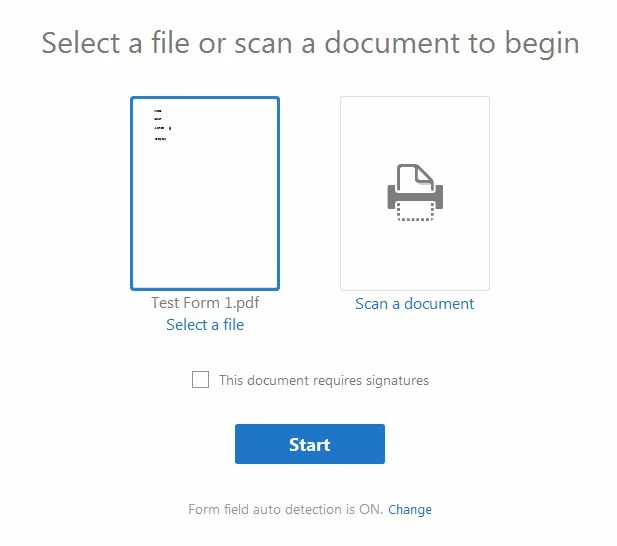
On this screen, select the file and click on start. Double click on the field and go to 'Options' tab. Select the appropriate check box.

Let me know if this work for you.

3 replies

Participating Frequently
October 2, 2020

For me the problem was that Adobe Acrrobat pro DC decided to change the status of all my fields to "locked" and "read only"


In order to fix that I went to "Prepare form" and then selected all fields and turned off both these settings in the properties.


After that it was back to normal. 


Participant
February 5, 2021

Great help!  Thank you!  Is this a default save setting. Anyone know of a way to turn it off??

August 31, 2015

Thank you! I did save the form in Reader Extended PDF so that users can complete the form and save their answers. I was able to edit the properties of the saved form by clicking "Prepare Form" as you advised.

I need to make multiple forms and find Adobe to be very challenging! I'm creating the form templates in Word and then using the Word file to create the PDF form. But I make mistakes and need to make constant edits, like not leaving enough space between questions to fit the text box. Is there an easier way to do this? I could not figure out how to create the form from scratch in Adobe.


Thank you!

Abhishamster
Participating Frequently
September 1, 2015

Hi Ally1286,

What I understand is that you are trying to edit Labels (Text) also which can be done using 'Edit PDF'. In this case I'll suggest you is to first create PDF from word document then make perform PDF Editing using 'Edit PDF' tool for any formatting or spacing changes. Then take the PDF file in form editing mode and develop it in a PDF Form. Going back and forth between PDF text editing and Form editing will be a tedious task and time consuming.

Participant
July 25, 2020

I spent $180 on this scam of a program!  I cant do the most basic function, which is to edit a form that I had saved. It edits THE ENTIRE FORM, EXCEPT MY ANSWERS !   No one know what to do ..

I'm going to purchase PdFfiller 

Abhishamster
AbhishamsterCorrect answer
Participating Frequently
August 28, 2015

Hi Ally1286,

Save a Copy is required to edit the form only when you have either distributed the form or saved it as Reader extended PDF. In this case if you want add Scroll feature to a field then go to (in DC) 'Prepare Form' tool under the toolset on the right.

On this screen, select the file and click on start. Double click on the field and go to 'Options' tab. Select the appropriate check box.

Let me know if this work for you.