
Answered
how to edit text in certificates??? Please help
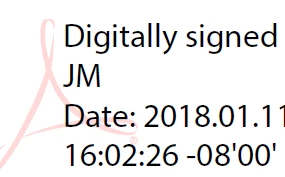
How do you edit the text in certificates? From the image below, I want to change the 'Digitally Signed', part to 'Digitally Reviewed' on the certificate. Please help!
Thanks
Jackie

How do you edit the text in certificates? From the image below, I want to change the 'Digitally Signed', part to 'Digitally Reviewed' on the certificate. Please help!
Thanks
Jackie
HI Jackie,
If you want to change the name of the name "JM" that appears here. That can be done when you create digital Id on Reader or Acrobat, it can't be altered once Id is created. And if this is purchased certificate then you have to check with Vendor.
For more information and changes that can be done are mentioned here: Custom Signature Appearances — Digital Signatures Guide for IT
Let us know if you have more questions.
-Tariq Dar
Already have an account? Login
Enter your E-mail address. We'll send you an e-mail with instructions to reset your password.
 AdChoices