sethlivingston
Participant
January 1, 2017
Answered

How to extract all pages as individual PDF files?

  • January 1, 2017
  • 1 reply
  • 25825 views

I have an N page PDF document named doc.pdf. I want to be able to automatically export all pages to individual PDF files, so I would have:

doc.pdf

doc-001.pdf

doc-002.pdf

...

doc-NNN.pdf

How can I do this with Acrobat?

Correct answer Document Geek

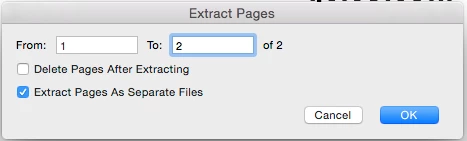
Yes. Just check the "Extract pages as separate files" button.

1 reply

Document Geek
Community Expert
Document GeekCommunity ExpertCorrect answer
Community Expert
January 1, 2017

Yes. Just check the "Extract pages as separate files" button.

Participant
February 22, 2025

Where do I find that button? I looked all over the program and could not find it. 

AnandSri
Legend
March 12, 2025

Hello Rick,


I hope you're doing well, and we apologize for the delayed response.


Go to All Tools or select Edit tool, and you will have the option to Extract pages. See this article for more information: https://adobe.ly/3Fq5v8H


I hope this helps.

Thanks,

Anand Sri.