
Participant
June 10, 2024
Answered

How to get checkmark images to identify as text

  • June 10, 2024
  • 2 replies
  • 665 views

Hi,


I have a pdf that lists the prices of different items and then at the bottom there are color options with checkmarks if it applies to the item. I am converting to an excel file to manipulate the data but I need to be able to reference the checkmarks but they are considered images when I use recognize text in adobe and when I convert to Excel. any ideas how I can adjust this. Such as making all the checkmarks an "x"? I'm not sure how I would mass edit these items though. I highlighted the checkmarks I'm talking about below.


Thanks,
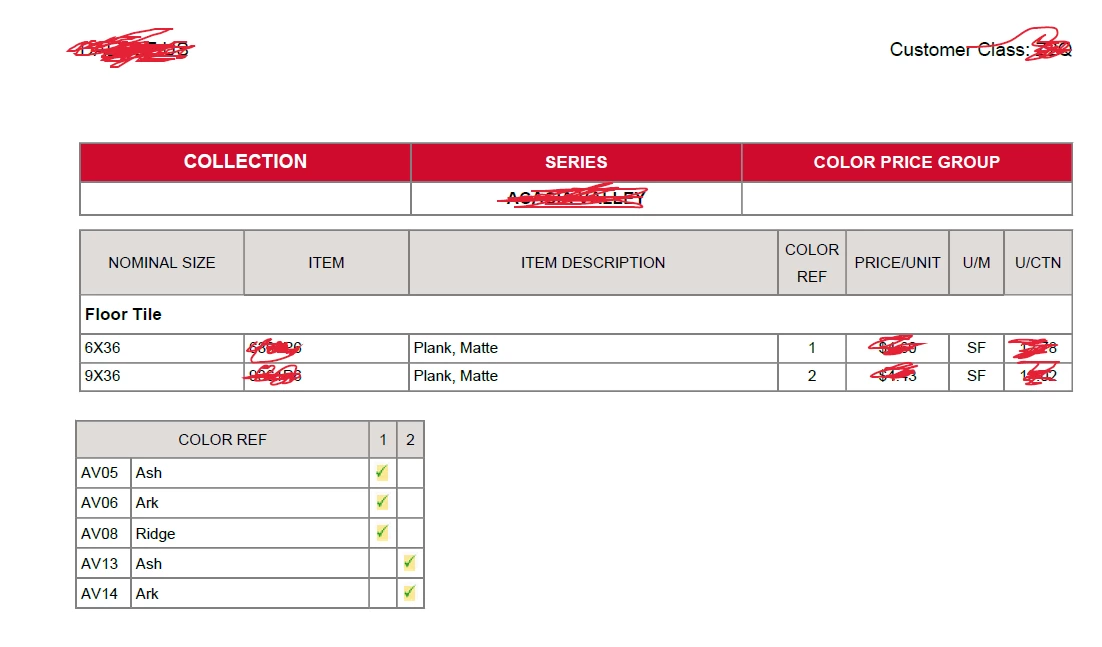
 

This topic has been closed for replies.
Correct answer try67

I don't think this is going to be possible if there's no text there at all, just an image. To do something like that would require quite an advanced (and custom-made) tool that will identify the images and place an X or something like that below them. Such a tool will probably need to run outside of Acrobat, though.

2 replies

try67
Community Expert
try67Community ExpertCorrect answer
Community Expert
June 10, 2024

I don't think this is going to be possible if there's no text there at all, just an image. To do something like that would require quite an advanced (and custom-made) tool that will identify the images and place an X or something like that below them. Such a tool will probably need to run outside of Acrobat, though.

Participating Frequently
June 10, 2024

You can try using Adobe Acrobat's "Edit PDF" feature to replace the checkmarks with "X"s manually. Another option could be using Excel's find and replace function after converting the PDF, searching for the image labels and replacing them with "X".

Participant
June 10, 2024
Hi,

Thanks for the response. Unfortunately, I tried both of these. You can't
find and replace images (which it identifies the checkmarks as) and there
are thousands of records so manual replacement isn't really feasible.

Thanks,