
How to get custom calculation fields to recalculate after override/change? HELP!
I am using Adobe Acrobat Pro 2017. I have VERY limited JavaScript experience and have been piecing solutions together based on what I've read here.
I have an estimate form where our Project Manager enters different subcontractor bid numbers and it subtotals. The next line has a place where they can enter a contingency percentage (entered in decimal but shows in %) and next to it, a cell calculates what that dollar amount is. It then adds the Subtotal and Contingency dollar amount to get a Total. Simple.
BUT the PM's wanted a way to override the Contingency dollar amount, so they can achieve a certain total (i.e. if a department had $3K to spend and the Subtotal was $2,334.75, they would backspace over the Contingency percentage (i.e. 15%, in this example) and type $665.25 in the Contingency dollar amount field to get it to total to $3K). They also wanted to be able to reenable the calculation, if for some reason the department comes back later and says to just calculate something with a fixed percentage.
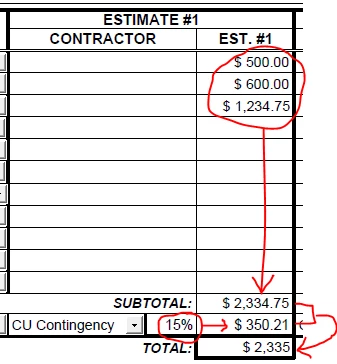
I added the JavaScript below to the "Calculate" tab under "custom calculation script" in the "Contingency Amount" cell (i.e. $350.21 in example above) and got it all to work (much to my surprise - it only took 3-4+ mo of reading through posts to find an answer that worked).
// Custom calculation script
// Get references to the input fields
var f1 = getField("Contingency1");
var f2 = getField("Subtotal_Est_1");
// If the field that triggered this calculation script is this one...
if (event.source && event.source === event.target) {
if (event.source.value === "") { // If this field was cleared...
event.value = f1.value * f2.value; // Set this field's value to the result of this calculation
}
} else if (event.source && event.source === f1) { // Set this field value to the calculated value if the quantity changed
event.value = f1.value * f2.value;
}
The problem is only the "subtotal" field totals accurately when new numbers are entered above - it's a simple formula. As you can see in the screen cap, the "Total" field isn't taking the "Contingency dollar amount" into consideration (i.e. $350.21). In addition, sometimes the "Contingency dollar amount" field doesn't show accurately if you reenter a new percentage in the "Contingency percentage field". (Yes, I know the "" field names don't match the Java Script, but I wrote the whole post before realizing that and ran out of time to update to match).
I found a work around by selecting the cell value, hitting backspace to remove everything, and then hitting enter. For whatever reason, it will recalculate the cell so it's correct (on both the "Total" and "Contingency Dollar Amount" cell). Unfortunately, there is NO way I'll get the PM's to do that every time the value changes on a cell and don't want to take the chance they forget and have wrong totals.
I've seen one solution from Nesa Nurani (3-22-22) that says to go to the Options Tab and check, "commit selected value immediately" but that's not showing in my Options tab. I saw another post that mentioned including the script, "this.calculateNow();" somewhere, but I have no idea where to add it. I tried adding it to the script I note above and it did nothing. HELP!
Cathy
 AdChoices